
Mastering Content Migration Challenges: Tzunami’s Solutions for Efficient and Cost-Effective Migrations

Content migration emerges as a formidable challenge in the intricate world of digital transformation. The seamless transition of vital information from one platform to another is not just a necessity but a strategic imperative for businesses navigating the ever-evolving digital landscape to consolidate onto a reliable standard platform. Yet, this seemingly straightforward task is riddled with complexities that can significantly impact operations, user experiences, and data integrity, especially when migrating from proprietary source systems.

In this digital age, efficiency and cost-effectiveness are more than benchmarks; they are the cornerstones of sustainable growth. Every minute lost and every dollar misspent can echo across an organization, affecting productivity and profitability. Recognizing these challenges, Reality Tech and Tzunami have forged a collaboration that stands as a beacon of innovative solutions in the realm of content migration.

Understanding Content Migration Challenges:

Content migration, in its essence, is akin to transplanting a vital organ. The data and content, often accumulated over the years, reside in intricate ecosystems of outdated or complex systems. The challenges encountered during this process are multifaceted. Outdated systems lack the agility to seamlessly integrate with modern platforms, causing disruptions in the very flow of information that businesses rely on. Complex systems, on the other hand, create a web of intricacies that demands intricate unraveling, from permissions, compliance, navigation, collaboration and formats

Data and content migration, in essence, is a delicate dance between preserving the integrity of information and ensuring a smooth transition and easy-to-use centralized consolidated storage. Outdated or incompatible systems often hinder this process, leading to disruptions, loss of data, and functionality, and diminished user experiences.

The need for solutions tailored to overcome these hurdles cannot be overstated. Generic approaches fall short when faced with the nuanced complexities of individual businesses.  Migration efforts can be significant, taxing the most capable of teams.  Tailored solutions, crafted with a deep understanding of both the technical intricacies and the unique operational demands of an organization, are the need of the hour.

1. The Challenge of Broken Links in Content Migration

During content migration, one of the most prevalent challenges is the phenomenon of broken links. These are not just hyperlinks; they are pathways critical for user experiences and data integrity. Broken links during content migration can disrupt workflows and compromise data integrity. The consequences of such disruptions echo across user experience and operational efficiency. Imagine a website, once harmonious in its navigation, now plagued by disjointed pathways, magnified by documents referencing the prior legacy location. This is the reality when links break. User experiences, carefully designed for intuitive interaction, crumble. Visitors, expecting seamless transitions, are met with dead ends, error pages and broken links inside documents. Moreover, beneath this disruption lies a deeper concern: data integrity. For organizations relying on accurate, real-time data, broken links mean distorted insights, leading to misguided decisions.

Introducing Tzunami’s Link Resolver Service: Fortifying the Bridges

Recognizing this challenge, our Link Resolver Service emerges as a beacon of reliability. This service isn’t content with merely transferring links; it meticulously studies, maps, and redirects them. What sets it apart is its ability to understand the intricate web of connections within an organizational landscape and preserve them during migration. This innovative and elegant solution ensures accurate link redirection post-migration, guaranteeing a seamless experience for users navigating the new digital terrain. Its benefits reverberate profoundly, particularly in SharePoint and Office 365 migrations, where precision is paramount.

How the Link Resolver Service Safeguards Data Integrity

At the core of our Link Resolver Service is a meticulous process of mapping and redirection. Every link and every piece of data is scrutinized, ensuring no information is lost in transition. This detailed approach safeguards the integrity of information post-migration, making certain that the organizational knowledge remains intact. By orchestrating this seamless digital transition, the Link Resolver Service becomes the guardian of data integrity, preserving the very essence of organizational wisdom.

Benefits of the Link Resolver Service

In the precision-demanding realms of SharePoint and Office 365, our Link Resolver Service shines brightly. It guarantees that every click post-migration lands precisely where it should, enhancing both user experiences and operational efficiency. The service doesn’t just preserve links; it elevates user interactions and ensures that the digital terrain of SharePoint and Office 365 is as familiar and functional as the previous platform. In these crucial migrations, precision is paramount, and our Link Resolver Service stands as the epitome of digital excellence.

2. Complexity URL Redirection Across Multiple ECM Systems

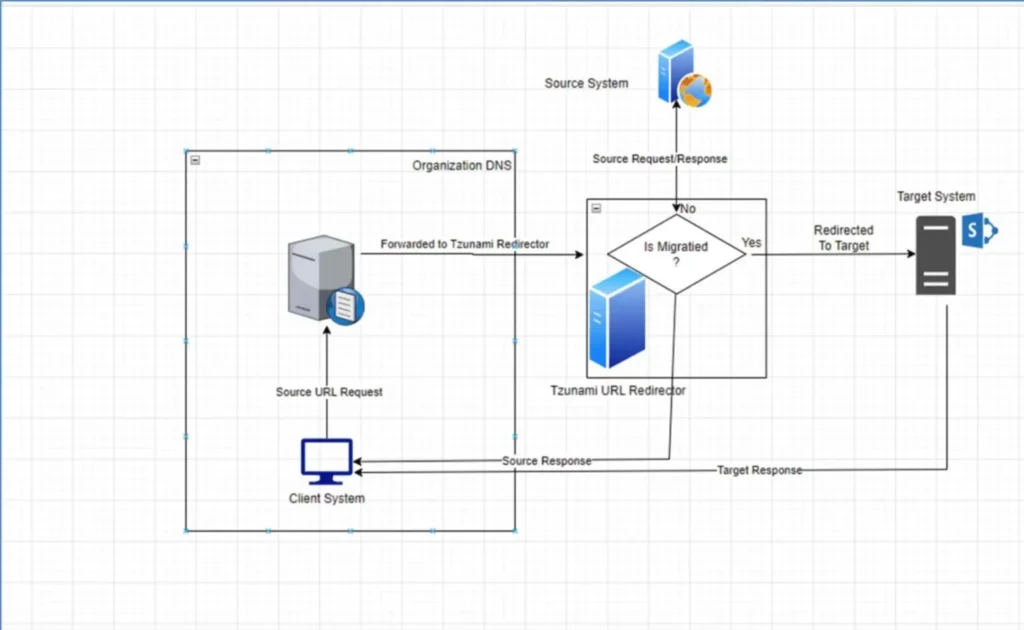
The challenges are vast when it comes to migrating content from various Enterprise Content Management (ECM) systems. Migrating content seamlessly from one ECM system to another is a challenge in itself. Different systems mean different structures, different URLs, and different linking methodologies. Managing this diverse array of URLs during migration is similar to navigating a maze without a map. Any misstep can lead to broken links, interrupted user experiences, and compromised data integrity.

Tzunami’s Redirection Solution: Seamlessly Redirect URLs

Here, our URL Redirection Solution steps in as a game-changer. This tool is not just a solution; it’s a bridge between diverse ECM systems. Its versatility is unmatched, allowing it to adeptly handle the complexities of Open Text Livelink, Documentum, ERoom, Confluence, and Docushare. Imagine a tool that ensures uninterrupted access to content throughout migration. Every link, every piece of content and every URL is carefully preserved and redirected to its new home. This seamless process mitigates broken links, preserves the integrity of data, and makes the seemingly impossible task of ECM migration not only manageable but efficient. In the realm of ECM diversity, our URL Redirection Solution is the thread that weaves continuity.

img-01

How Tzunami’s Solution Supports Diverse Platforms

In the realm of Open Text Livelink, Documentum, ERoom, Confluence, and DocuShare, the solution acts as a translator, ensuring that URLs are understood universally. It seamlessly integrates with each platform, comprehending the unique language of URLs spoken by these systems. When migrating from Documentum, known for its intricate document management, to SharePoint, the solution deciphers Documentum’s URLs, ensuring that every link finds its new home accurately. Similarly, from Confluence, where collaboration is king, to the structured environment of SharePoint, the solution bridges the gap, preserving the integrity of URLs.

3. The Challenge of Migrating Extensive Volumes of Data

Migrating extensive volumes of data is like orchestrating a symphony with countless instruments. Each piece, each byte of data, demands meticulous handling to ensure a harmonious transition. Challenges abound; the sheer volume of information can overwhelm, leading to bottlenecks, errors, and delays. The stakes are high: any disruption can echo across the organization, affecting not just productivity but also the bottom line. Large-scale migrations are a battleground where efficiency and cost-effectiveness are the armor organizations need to emerge victorious; using enterprise-class robust migration tools.

Pre-migration analysis

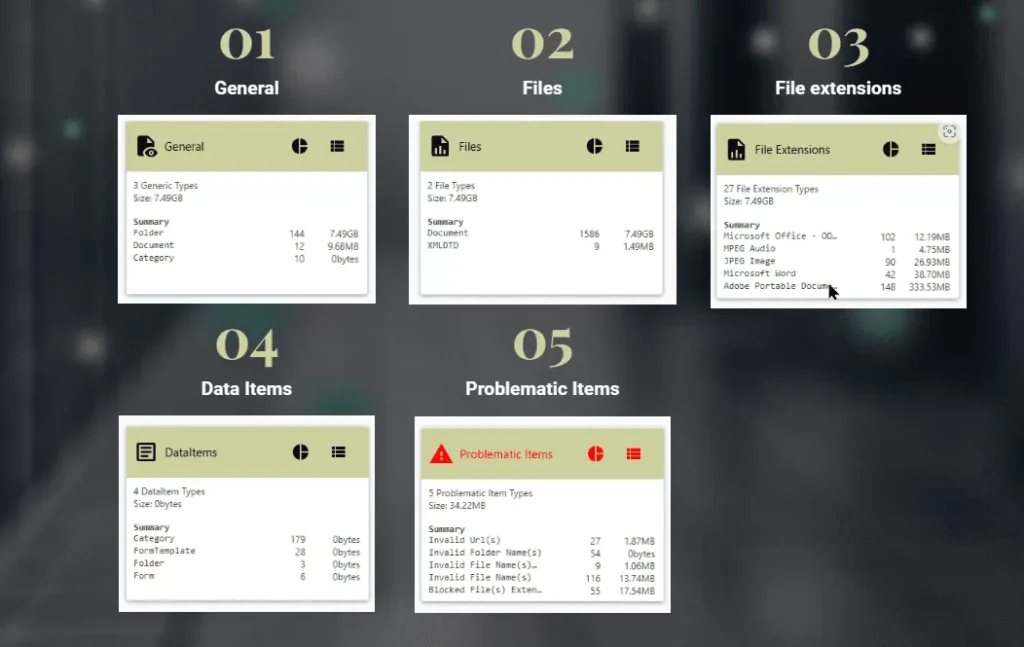
Some important pre-migration reports need to be generated as part of pre-migration, or discovery, which not only help us understand the complexity during migration but are also helpful to prepare a better time estimation.

Tzunami’s Migration Solution can help to achieve this. It scans your source system and provides five types of pre-migration reports:

img-02

Ensuring Data Security in Content Migration

Tzunami’s Migration Solution prioritizes data security during large-scale migrations, providing robust security features and compliance measures to protect sensitive data. This is crucial in industries like healthcare and finance. The solution ensures a secure transition for organizations.

The Delta Migration Solution: Streamlining Complexity & Reducing Costs

Tzunami’s Delta Migration Solution stands as the answer to these challenges. With a single click, this tool streamlines the migration process and reduces operational costs. By focusing on newly modified data, it optimises resources and ensures that the latest changes seamlessly integrate into the new SharePoint environment. This approach not only saves time but also significantly reduces the expenses associated with migration projects, making it a cornerstone of efficient content migration strategies.

img-03

Analyze

Reporting Excellence in Content Migrations

Effective content migration involves more than just the physical transfer of data; it requires comprehensive reporting capabilities. Tzunami’s Migration Solution offers robust reporting functionality, enabling organisations to track and monitor the progress of the migration in real-time. This feature provides detailed insights into what data has been successfully migrated, any potential issues encountered, and the overall status of the migration project. With access to this information, organizations can make informed decisions, troubleshoot any migration challenges promptly, and ensure the entire process is transparent and well-documented. This reporting functionality not only enhances the efficiency of the migration but also contributes to compliance, accountability, and overall project success.

The Power of Collaboration: Reality Tech and Tzunami

In the digital solutions world, the collaboration between Reality Tech and Tzunami emerges as a beacon of innovation. Reality Tech, with its profound industry knowledge, teams up with Tzunami, a specialist in migration tools, creating a synergy that addresses the most complex content migration challenges. By combining expertise and cutting-edge solutions, this partnership offers businesses a holistic approach to content migration, ensuring not only seamless transitions but also long-term stability and efficiency in the digital landscape.

img

How Businesses Can Benefit

For businesses seeking transformative content migration experiences, Reality Tech offers tailor-made solutions. By understanding the intricacies of each challenge, these collaborations craft precise, efficient, and cost-effective strategies. From resolving broken links to simplifying URL redirection and optimizing large-scale migrations, these solutions are designed to align seamlessly with business objectives. Engaging with this partnership means embracing not just solutions but enduring partnerships that guarantee long-term success in the digital sphere.

In the realm of content migration challenges, Reality Tech partnered with Tzunami and emerged as a pioneer, offering collaborative solutions that redefine the narrative. By tackling broken links, simplifying URL redirection, and optimizing large-scale migrations, this partnership ensures that businesses not only transition seamlessly but also flourish in the digital age. As industries evolve and challenges transform, this collaboration stands as a beacon of stability, offering businesses not just solutions but enduring strategies for content migration excellence. Embrace the future of content migration with Reality Tech and Tzunami, where challenges become opportunities and transitions pave the way for digital success.

SharePoint Customization: Tailoring Your SharePoint Environment To Fit Business Needs

In today’s rapidly evolving business landscape, where adaptability and efficiency are paramount, customization has emerged as a pivotal strategy to align digital platforms with unique organizational requirements.

SharePoint Online Modern emerges as a versatile and responsive platform that offers an array of customization options to revolutionize how businesses collaborate, manage content, and achieve their goals.

This comprehensive blog delves deep into the realm of SharePoint Online Modern customization, providing an extensive exploration of tools, techniques, and best practices that empower organizations to harness the full potential of their SharePoint experience.

1.Introduction to SharePoint Online Modern Customization

Modern workplaces demand modern solutions. SharePoint Online Modern stands at the forefront of this evolution, providing a dynamic ecosystem for organizations to streamline their workflows, enhance communication, and boost productivity.

Through targeted customization, businesses can adapt SharePoint to their exact needs, creating an environment that seamlessly integrates with existing processes and workflows.
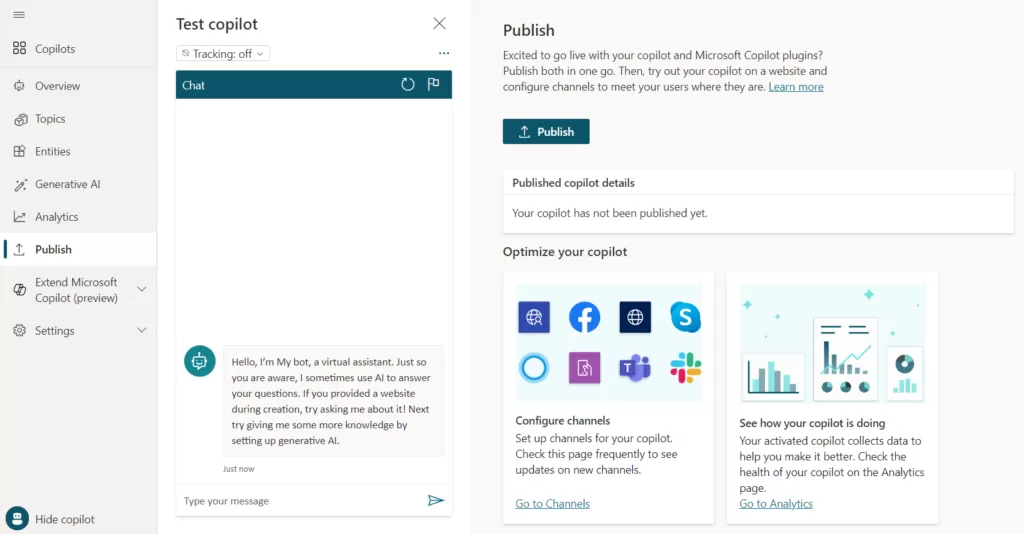
The role of customization in SharePoint Online Modern cannot be overstated. It bridges the gap between the out-of-the-box platform and the specific needs of an organization.

By tailoring SharePoint to align with business processes and user expectations, organizations can drive user engagement, simplify complex tasks, and ultimately elevate the efficiency of their operations.

img-01

2. Visual Site Branding and Theming
First impressions matter, even in the digital world. Modern site branding offers an opportunity to make a lasting impact.

By crafting visually appealing and consistent branding elements such as themes, colors, and logos, organizations can create an immersive digital experience that resonates with their brand identity.

A cohesive and attractive branding not only enhances user recognition but also contributes to a sense of professionalism and credibility within the platform.

Before branding

img-02

after branding

img-03

Streamlined Navigation and Hub Sites

Intuitive navigation is the cornerstone of user-friendly experiences. SharePoint Online Modern enables organizations to tailor navigation elements, including global navigation, mega menus, and hub sites.

These customization options not only make navigation more intuitive but also facilitate the discovery of related content and resources.

Hub sites, in particular, play a pivotal role in connecting sites with shared themes or projects, promoting cross-collaboration and information sharing.

img-04

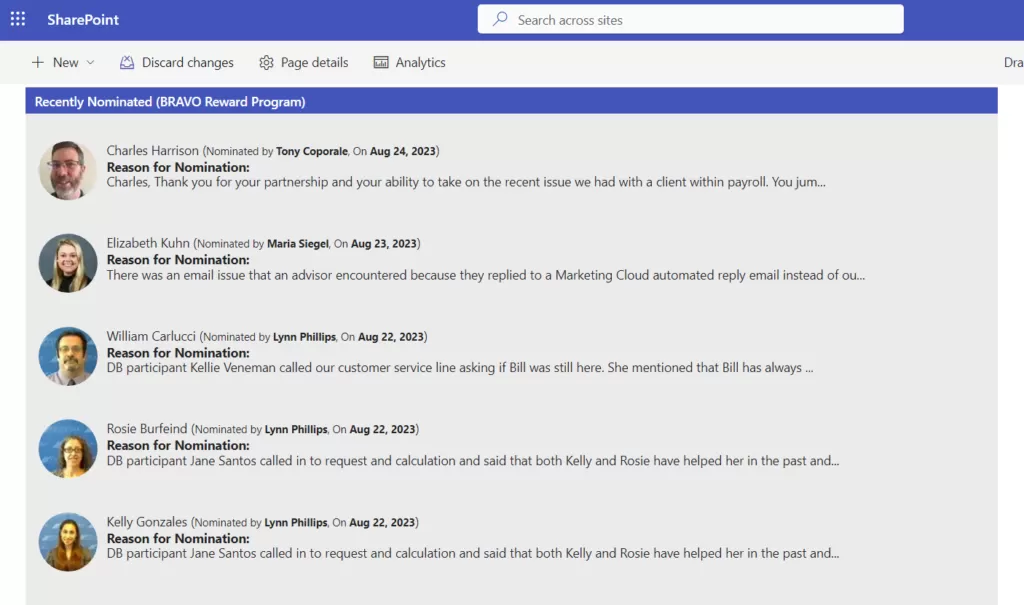
4.Crafting Engaging Page Layouts and Modern Page Designs

Content presentation can make or break user engagement. Modern page layouts offer a consistent and visually appealing way to present content.

By leveraging modern web parts, organizations can enhance page functionality and user interactivity.

These components are not only responsive but also empower content creators with diverse tools to craft engaging and dynamic pages.

img-05

5. Modern Communication Sites Customization

Communication is the lifeblood of collaboration. Modern communication sites offer customization options for layouts, headers, footers, and more, enabling organizations to create visually appealing and engaging communication platforms.

The integration of news and events using modern web parts maximizes the impact of important announcements.

6. Designing Site with Modern Scripts

Consistency is key in user experiences. Modern site designs provide a mechanism to provision consistent site structures and layouts.

Automation through modern scripting techniques ensures that site customization is efficient and scalable, reducing manual efforts and minimizing inconsistencies.

img-06

7. Dynamic Content with Modern Web Parts

Modern web parts form the backbone of SharePoint customization. These versatile components empower users to integrate dynamic content seamlessly into their sites

From displaying news and announcements to embedding rich media, modern web parts are the building blocks of interactive and engaging pages.

Their responsive design ensures that content looks stunning across various devices, catering to the modern workforce’s diverse needs.

img-07

8.Lists and Libraries Modern Customization

Data organization and presentation are central to business success. Modern lists and libraries offer various customization options to enhance data presentation.

Column formatting and view customization improve data visualization, making information more accessible and actionable.

Integration of custom forms and Power Apps further streamlines data collection and management processes.

img-08

9.Enhancing Document Management

Effective content management requires efficient categorization. Modern document libraries with custom metadata columns facilitate easy content organization and discovery.

By configuring metadata navigation, organizations can empower users to quickly locate relevant documents, improving efficiency and productivity.

img-09

10. Managing Permissions and Security

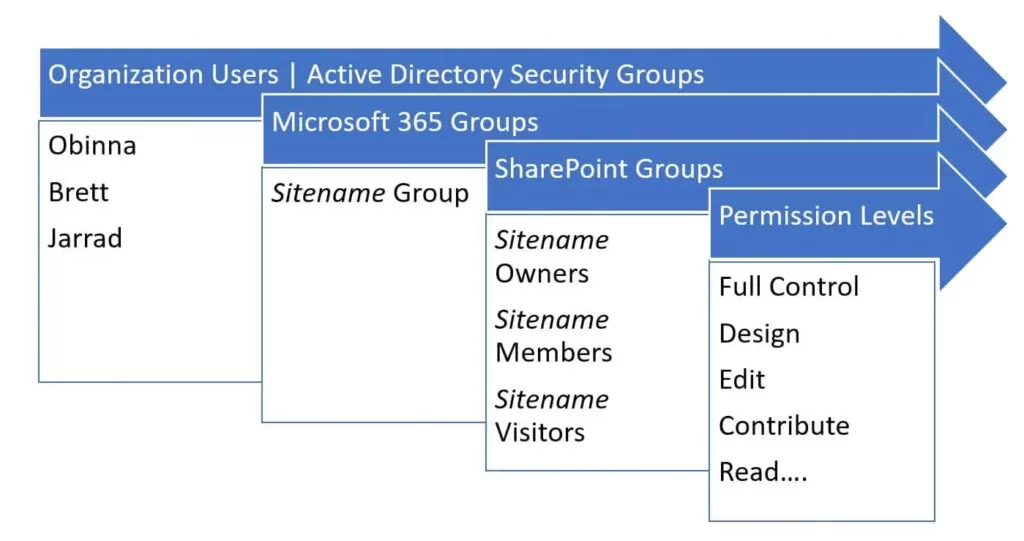
Security remains a paramount concern in digital environments. SharePoint Online Modern offers advanced permissions management, leveraging Office 365 groups to simplify access control.

By managing sharing settings and exploring external sharing options, organizations can strike a balance between collaboration and data security.

img-10

11. Optimizing Search Experience

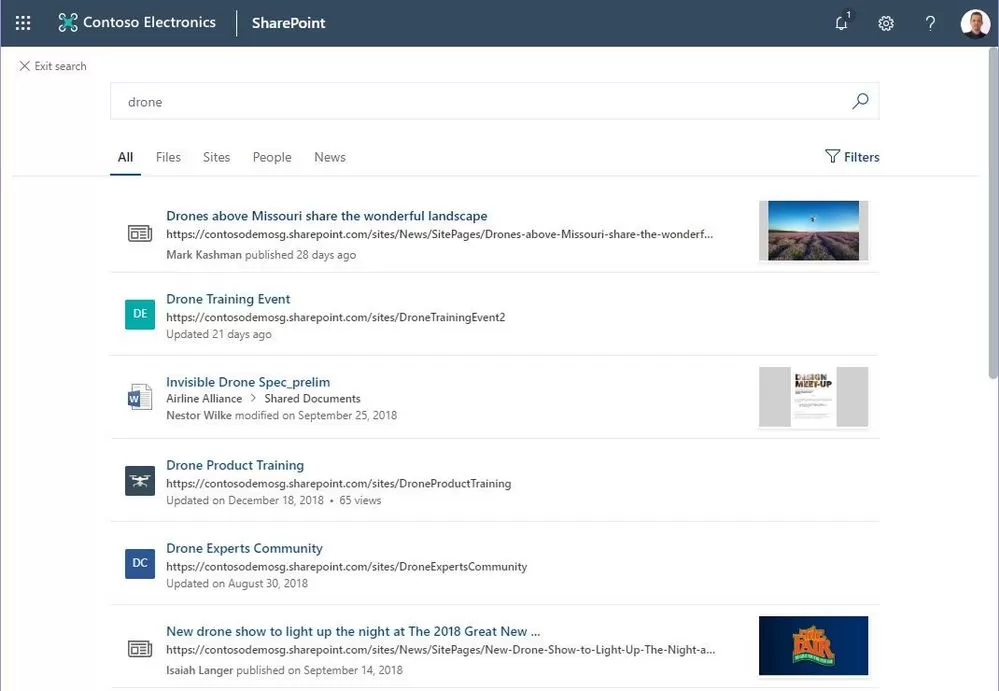
Efficient content discovery accelerates decision-making. Modern search configuration enhances the user experience by optimizing search settings.

Modern search web parts further empower users to discover relevant content quickly, leading to better-informed and more productive teams.

img-11

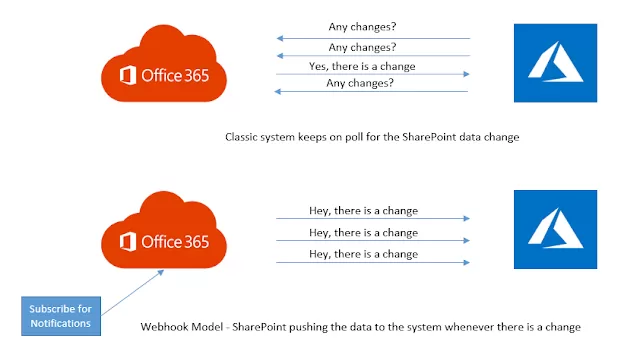
12. Real-time interaction with Webhooks and Remote Event Receivers

Real-time interactions drive seamless processes. Modern Webhooks facilitate external interactions, enabling real-time integration with other systems and services.

Remote Event Receivers streamline automation by triggering actions based on specific events, enhancing efficiency, and reducing manual intervention.

img-12

13. Building with SharePoint Framework (SPFx) 

Custom solutions enrich the SharePoint experience. SharePoint Framework (SPFx) empowers developers to craft custom web parts, extensions, and solutions tailored to specific business needs.

Integrating SPFx solutions seamlessly into modern SharePoint Online pages ensures a cohesive and unified user experience.

img-13

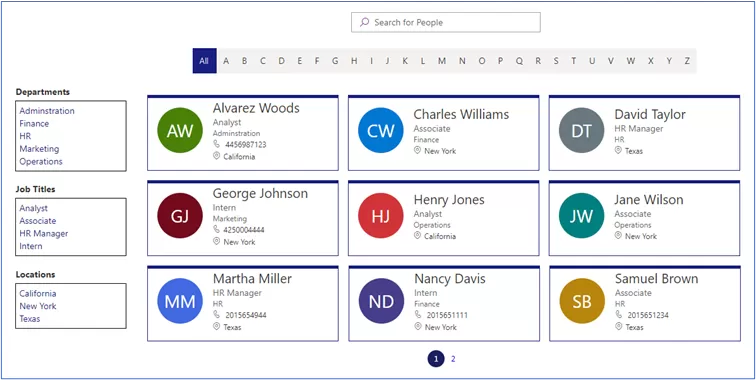
Employee Directory:
img-14

14. Customization with Power Apps, Power Automate, and Power BI

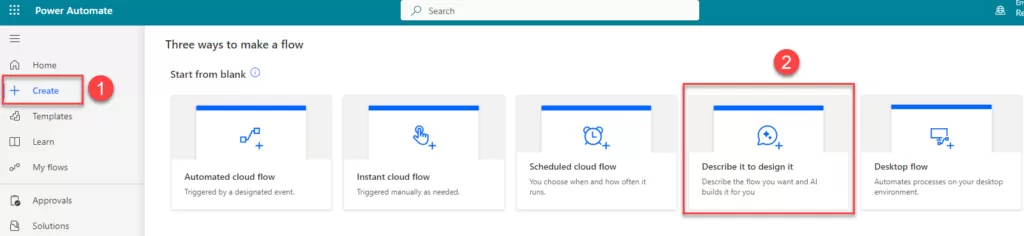
Microsoft’s Power suite amplifies customization possibilities. Power Apps enables the creation of custom applications and forms directly within SharePoint, streamlining processes and enhancing user experiences.

Power Automate automates workflows, reducing manual efforts and increasing efficiency. Power BI visualizes data and insights, empowering organizations to make data-driven decisions with the option to embed reports directly into SharePoint pages.

Power BI –

img-15

img-16

img-17

Power Automate –

Home Screen –

img-18

Login as an Employee –

img-19

New Leave Request Form –

img-20

Login As A Manager –

img-21

15. Seamless Integration with SharePoint

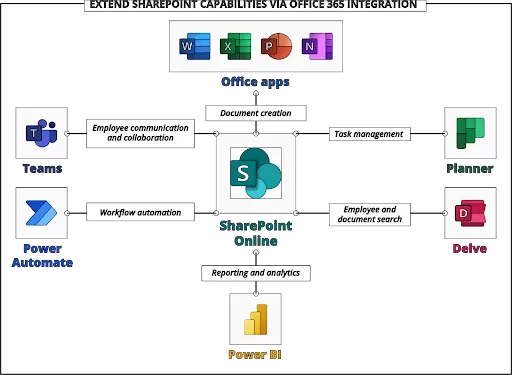
The Microsoft 365 ecosystem thrives on collaboration. Seamlessly integrating SharePoint with other Microsoft 365 apps enhances productivity and functionality.

Custom solutions built using Power Apps, Power Automate, and Power BI seamlessly enrich SharePoint’s capabilities, offering holistic and powerful solutions.

img-22

Conclusion: Embracing Modern Customization

In a digital era where adaptability drives success, SharePoint Online Modern customization emerges as a transformative force. Through customization, organizations optimize user experience, enhance productivity, and unleash the true potential of SharePoint Online.

With this being said, it’s time to migrate to SharePoint Online. Explore the reasons why you should migrate to SharePoint Online and Tips for Migration.

By embracing the full spectrum of customization options, businesses can create a SharePoint ecosystem that aligns perfectly with their goals, processes, and culture.

If you’re seeking the right partner to unleash the full potential of SharePoint for your business, look no further. Discover how to choose the right SharePoint services firm and embark on a journey of seamless collaboration, heightened productivity, and sustained success in the remote work landscape with Reality Tech.

From fine-tuning tenant settings and implementing central metadata to crafting an enterprise branding strategy and utilizing powerful customization tools, Reality Tech’s professional expertise unlocks the true potential of SharePoint Online.

By assisting clients in customizing SharePoint to precisely fit their business requirements, Reality Tech paves the way for seamless collaboration, heightened productivity, and sustained success in the remote work landscape.

Embrace the power of SharePoint customization and embrace a future of unparalleled success in remote collaboration with Reality Tech.

Approvals and Notifications: Streamlining Business Processes with Power Automate

Efficiency and productivity are critical metrics in today’s fast-paced business environment. Manual processes can often hinder progress and lead to bottlenecks in critical workflows.

Enter Power Automate, a powerful workflow automation tool by Microsoft that enables organizations to streamline their business processes, automate repetitive tasks, and improve collaboration.

In this blog, we explore the incredible capabilities of Power Automate for creating approval workflows and sending notifications, revolutionizing the way businesses operate.

The Power of Power Automate: Revolutionising Workflow Automation

Power Automate, formerly known as Microsoft Flow, is a cloud-based service that empowers organizations to automate processes across various applications and services.

With its intuitive user interface and extensive library of connectors, Power Automate enables seamless integration and automation, eliminating the need for manual interventions and saving valuable time.

Unleashing Efficiency with Power Automate:

  1. Automating Repetitive Tasks: Manual handling of repetitive tasks can be time-consuming and error-prone. Power Automate allows businesses to automate routine processes, such as data entry, approvals, and document management, increasing productivity and accuracy.
  2. Streamlining Business Processes: Power Automate optimizes end-to-end workflows, ensuring a smooth flow of information and tasks between teams. By reducing bottlenecks and delays, organizations achieve faster turnaround times and enhanced efficiency.

Empowering Approval Workflows:

  1. Sequential and Concurrent Approvals: Power Automate offers flexible options for approval workflows. Organizations can configure sequential approvals, where tasks are assigned in a specific order, or concurrent approvals, where multiple approvers can evaluate tasks simultaneously.
  2. Multi-User Approvals: In scenarios where input from multiple users is required, Power Automate allows organizations to set up one out of several users’ approval, ensuring a more collaborative decision-making process.
  3. Document Management: Power Automate enables seamless document approval processes. Documents can be hidden until approved, collecting feedback from approvers before publishing as a major version.

Seamless Notifications Real-Time Updates:

  1. Configurable Notifications: Stay informed with real-time notifications through email, Microsoft Teams, or mobile alerts. Power Automate allows businesses to configure notifications for important events or updates, ensuring stakeholders are always aware of critical changes.
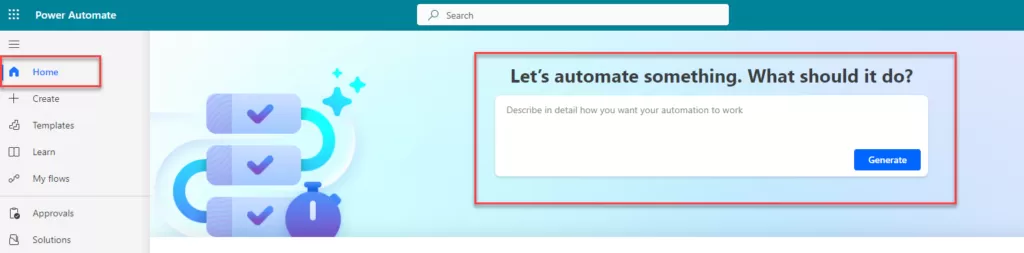
  2. Approval Dashboards: Power Automate offers a dedicated space for managing approvals, eliminating the need to create separate dashboards. Users can conveniently approve or reject tasks directly from the built-in approval panel.

    This panel, located within the left navigation of Power Automate under the “Approvals” tab, provides an intuitive interface for users to review and respond to pending approval requests. Moreover, users can access the history of previous approvals, gaining valuable insights into the progress of tasks.

Integration Capabilities with SharePoint and Beyond: 

Power Automate seamlessly integrates with various business applications, including SharePoint, Salesforce, Outlook Calendars, SQL Server, Teams, and Planner.

This robust integration enhances automation capabilities, allowing businesses to leverage their existing tools while improving workflow efficiency.

Realizing the Potential: Power Automate in Action

  1. Expense Approvals: Power Automate expedites expense approvals by automating the submission and review process, reducing reimbursement times, and ensuring compliance.
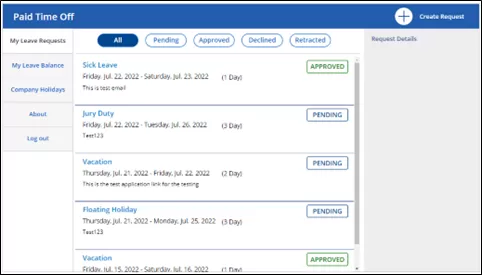
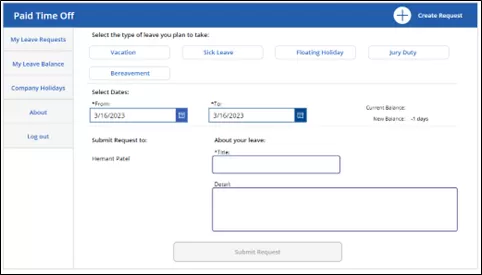
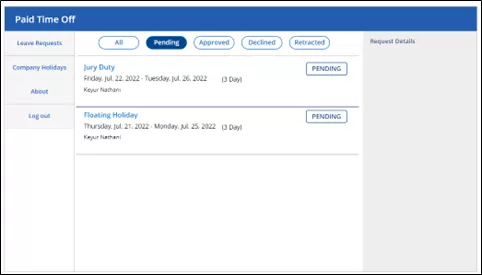
  2. Leave Requests: Streamlined leave approval processes ensure timely approval and better management of employee time off.
  3. Purchase Orders: Automating purchase order approvals minimizes delays and optimizes procurement processes.

Conclusion:

Power Automate empowers organizations to transform their business processes, enhancing productivity and collaboration through efficient approval workflows and real-time notifications.

Dive into the world of workflow automation and Seamlessly Automate Your SharePoint Tasks with Power Automate.

At Reality Tech, we are experts in Power Automate, enabling businesses to harness the full potential of this automation tool.

With a focus on streamlining workflows and optimizing efficiency, Reality Tech assists clients in designing and implementing tailored approval processes that suit their unique business needs.

Embrace the power of Power Automate and unlock unparalleled efficiency in your business today.

Harnessing Data Insights With Power BI: Optimizing Decision-Making And Business Performance

The power of making informed decisions isn’t just advantageous; it’s a prerequisite for success. Organizations across the spectrum are recognizing the need to convert raw data into actionable insights, fueling their growth strategies and enhancing overall performance.

This is where the extraordinary capabilities of Power BI come into play, revolutionizing the way businesses extract, visualize, and interpret data. In this article, we delve into the realm of Power BI, exploring its seamless integration with existing systems, industry-specific use cases, scalability, performance, continuous monitoring, and alerts.

Let’s unravel the potential of Power BI and how it empowers businesses to make smarter decisions while optimizing their overall performance.

img-01

Integration with Existing Systems: A Synergy of Data and Familiarity

img-02

At the core of Power BI lies its remarkable ability to effortlessly integrate with a range of existing systems and platforms.

This integration extends to Microsoft’s own suite of products, including Excel, SharePoint, and Teams as well as numerous other external data repositories.

The synergy between Power BI and these familiar platforms empowers users to leverage their existing data infrastructure while gaining new insights. This easy integration not only streamlines data access but also promotes collaboration within environments that users are already comfortable with.

By connecting Power BI with Excel, users can elevate their data analysis capabilities to new heights, transforming static spreadsheets into interactive visualizations.

Integrating Power BI with SharePoint, including consolidating SharePoint list data, facilitates the creation of interactive reports and dashboards, enhancing data sharing and accessibility.

Moreover, combining Power BI with Teams facilitates real-time collaboration, allowing teams to analyze and discuss insights without leaving the communication platform.

This level of integration redefines how organizations harness the power of their data, effortlessly merging analysis with existing workflows.

Industry-Specific Use Cases: Precision in Diverse Fields

Power BI’s impact is magnified when tailored to industry-specific needs. Across sectors like retail, healthcare, finance, and manufacturing, organizations are leveraging Power BI’s capabilities to uncover insights that drive impactful decisions.

Healthcare Industry:

  • Patient Care: Power BI can analyze patient data to identify patterns and trends, enabling healthcare providers to offer more personalized and efficient care.
  • Hospital Efficiency: Hospitals can use Power BI to monitor and optimize resource allocation, staff scheduling, and patient flow, ultimately improving operational efficiency.
  • Cost Analysis: Power BI can help healthcare organizations track and manage costs, making healthcare more affordable and accessible.

Finance Sector:

  • Financial Reporting: Power BI allows financial institutions to create interactive dashboards for financial reporting and analysis, making it easier to track key metrics.
  • Risk Management: By integrating data from various sources, Power BI can help identify and mitigate risks in real time, ensuring better risk management.
  • Market Analysis: Financial analysts can use Power BI to monitor market trends, track investments, and make data-driven decisions.

Manufacturing Industry:

  • Production Optimization: Power BI can analyze production data to identify bottlenecks and inefficiencies, leading to better production planning and resource allocation.
  • Supply Chain Management: Manufacturers can use Power BI to gain visibility into their supply chain, track inventory levels, and optimize logistics and procurement.
  • Quality Control: Power BI can be used for quality control by analyzing data from sensors and machines to identify defects and reduce product recalls.

Retail Industry:

  • Sales Analysis: Retailers can use Power BI to analyze sales data, including product performance, sales trends, and seasonality. This allows for better inventory management and pricing strategies.
  • Customer Insights: Power BI helps retailers segment customers, understand their preferences, and personalize marketing efforts, improving customer retention and loyalty.
  • Inventory Management: Real-time inventory tracking and predictive analytics help retailers optimize stock levels, reducing overstock and stockouts.

In addition to these industries, Power BI can be applied to many other sectors, such as education, energy, agriculture, and more. Its flexibility and powerful data visualization capabilities make it a valuable tool for organizations looking to apply data-driven insights and make informed decisions in today’s data-driven world.

Scalability and Performance: Empowering Growth and Expansion 

img-03

As organizations grow, both their data requirements and the sources of data expand exponentially. Power BI is built to accommodate this growth through its scalability and performance-enhancing features.

Power BI’s cloud-based architecture allows businesses to scale up or down as needed, accommodating increasing data volumes and user demands.

Its DirectQuery and Live Connection capabilities ensure that reports and dashboards reflect real-time data, providing accurate insights for critical decision-making.

With Power BI’s Dataflow feature, organizations can preprocess and transform data before visualization, enhancing performance and saving time.

Power BI’s elasticity ensures that as businesses evolve, their data capabilities evolve with them, providing consistently high performance and usability.

Continuous Monitoring and Alerts: Staying Ahead in Real-Time

Business insights are most valuable when they’re timely. Power BI understands this need and offers continuous monitoring and alerts.

With Power BI’s automated refresh and scheduling capabilities, reports and dashboards are updated in real-time.

Users can set up alerts based on specific thresholds or conditions, ensuring that key stakeholders are promptly notified when critical metrics are met or exceeded.

This feature enables organizations to respond swiftly to changing scenarios, seizing opportunities and mitigating risks as they arise.

The ability to proactively monitor data and receive alerts ensures that businesses are always ahead of the curve.

img-04

Visual Impact: Making Complexity Understandable

Power BI’s prowess isn’t limited to data analysis; it’s about lucid communication. The ability to translate intricate data into comprehensible insights through interactive dashboards and tailored visuals is its forte.

Visualizations like charts, graphs, and maps render complex data in user-friendly formats, allowing data narratives to be intuitive and accessible.

Visualization elevates Power BI beyond mere analysis – it’s the conduit that transforms complex insights into actionable strategies.

In conclusion, Power BI stands as a beacon of data-driven decision-making, offering a suite of tools and capabilities that empower organizations to optimize their performance.

img-05

Discover Power BI Solutions and how effortlessly it transforms raw data into decision-driving insights, optimizing performance across industries.

With its smooth integration, industry-specific adaptability, scalability, performance-enhancing features, and real-time monitoring, Power BI redefines how businesses make use of the potential of data.

As organizations navigate the complexities of the modern world, Power BI stands as a trusted ally, driving insightful decisions and unlocking new avenues of growth and success. Embrace the power of Power BI and steer your business toward a future of data-driven excellence.

As you navigate the complexities of data-driven decision-making, tap into the power of Power BI with Reality Tech. Our expertise not only ensures flawless integration but also maximizes the potential of Power BI in your unique context.

With a proven track record of delivering impactful solutions, we’re your partners on the journey to data-driven excellence.

Embrace the possibilities that Power BI offers, and steer your business toward a future defined by intelligent insights and optimized performance.

The Power of Workflow Automation: Simplifying Business Processes With Power Automate

Introduction:

Efficiency and productivity reign supreme in today’s rapidly changing business landscape. However, manual tasks and intricate processes often act as roadblocks, impeding progress and consuming valuable time. Fortunately, the advent of workflow automation has emerged as a game-changing solution, transforming the way businesses operate. At the forefront of this digital transformation stands Microsoft’s Power Automate, a dynamic platform that streamlines operations, enhances collaboration, and propels productivity to unprecedented heights.

The Challenge Before Power Automate

Before delving into the capabilities of Power Automate, it’s crucial to understand the challenges that organizations faced in a pre-automation era. Before the introduction of Power Automate, businesses grappled with numerous challenges like:

  • Manual Tasks: Repetitive and time-consuming tasks drained valuable resources, with employees spending countless hours on data entry and form filling. This not only consumed valuable time but also left room for errors, potentially leading to data inaccuracies and compliance issues.
  • Complex Processes: Navigating intricate workflows often resulted in errors and delays. Managing approvals, notifications, and data flows became increasingly challenging.
  • Communication Gaps: Siloed data and inefficient communication hindered collaboration, with teams operating in isolation and having limited access to critical information.
  • Email Overload and Document Version Confusion: Users frequently found themselves inundated with a deluge of emails, often accompanied by attachments. This email-centric approach created document version confusion, making it challenging to track and manage critical information effectively.

The Power Automate Solution

Power Automate steps in as the solution to these challenges, driving both operational efficiency and cost savings. It’s not just about automating tasks; it’s about reimagining how processes operate. Power Automate offers a transformative solution to these challenges, simplifying business processes by automating tasks and reducing the need for manual intervention. This not only makes complex processes efficient and error-resistant, ensuring tasks progress smoothly and accurately, but it also results in cost efficiency by reducing manual labor, minimizing errors, and streamlining processes. Silos are broken down, enabling seamless data sharing and collaboration.

How Power Automate Works

At its core, Power Automate leverages workflows to automate and optimize tasks and processes:

  • Forms and Actions: Custom workflows are built using forms and actions tailored to an organization’s needs. These workflows define how tasks are executed, providing a structured framework for managing processes efficiently
  • Event-Based Triggers: Actions are triggered based on specific events or conditions. For example, an approval workflow can be initiated when a request is submitted, eliminating the need for manual intervention and ensuring timely processing.
  • User-Friendly Interface: Power Automate offers an intuitive interface that allows users to design and customize workflows without needing extensive technical knowledge. Moreover, the interface and forms are mobile-friendly and responsive, enabling work on the go and ensuring that users can stay productive from any device, anywhere.
  • Automated Reminders and Escalations: Within the Power Automate ecosystem, automated reminders and escalations play a crucial role in streamlining exception handling. These features ensure that critical tasks are not overlooked, deadlines are met, and exceptions are promptly addressed. This proactive approach to process management enhances efficiency and reduces the risk of errors.

Explore how Power Automate can seamlessly integrate with your business processes to optimize approvals and notifications, driving efficiency and agility across your organization.

Key Features of Power Automate

Power Automate offers several key features that are instrumental in enhancing business processes:

  • Connectors: Integration with enterprise systems and third-party tools ensures that data flows seamlessly across applications and platforms.

img-01

  1. SQL Server: This connector enables interaction with Microsoft SQL Server databases. You can perform actions like querying databases, inserting records, updating data, and executing stored procedures.

img-03

2.Salesforce: This connector provides integration with Salesforce, a widely used Customer Relationship Management (CRM) platform. It enables actions like creating, updating, and retrieving records, as well as triggering workflows based on Salesforce events.

img-03

3. SharePoint: This connector is specifically designed for interacting with SharePoint Online.It allows you to perform operations such as creating, updating, and deleting files/items and lists within SharePoint.

img-04

4. OneDrive for Business: This connector allows you to automate tasks related to OneDrive for Business, including actions like creating, updating, and deleting files.

  • Data Capture: Automates data collection from various sources, reducing the need for manual input and enhancing data accuracy.
  • Document Creation: Generates dynamic and personalized documents, such as contracts, reports, and invoices, based on predefined templates and data sources.
  • Dashboards: Power Automate provides intuitive dashboards that offer real-time visibility into workflow progress, allowing users to track and monitor the status of various processes. This feature enables better decision-making and keeps stakeholders informed.
  • Notifications: Power Automate allows for the configuration of notifications at various workflow stages. Users can receive alerts, updates, and reminders, ensuring that critical tasks are addressed promptly and efficiently.
  • Workflow Step Logging: Every step within a workflow can be logged and tracked, providing a detailed history of actions taken. This feature enhances transparency and accountability, as users can review the sequence of events within a workflow.

Seamless Integration with Existing Systems

Power Automate seamlessly integrates with various systems, creating a unified workflow. This includes integration with Microsoft Forms for data capture from multiple sources and SharePoint for enhanced document management and collaboration. It can also be easily integrated with a variety of third-party tools, ensuring a seamless fit within your existing technology ecosystem.

AI Integration for Enhanced Automation

Power Automate goes beyond traditional automation by leveraging artificial intelligence (AI) to enhance its capabilities. Through AI-driven features, the platform can learn from user interactions and make intelligent suggestions for workflow improvements. This adaptive learning allows organizations to fine-tune their processes over time, making them even more efficient and effective.

Additionally, Power Automate can seamlessly integrate with Microsoft’s AI services, unlocking advanced functionalities like natural language processing, image recognition, and predictive analytics. This integration empowers businesses to harness the power of AI to optimize their workflows, extract insights from data, and make more informed decisions.

Streamlining Data Capture and Document Creation

Effortless data capture and dynamic document creation are two standout features of Power Automate. By automating data capture from various sources, manual input is eliminated, reducing errors and improving data accuracy. Dynamic document creation enables the generation of personalized documents like contracts and reports based on predefined templates and data sources, saving both time and ensuring consistency.

Enhanced Collaboration and Insights and Scalability

Power Automate goes beyond automation; it empowers organizations with robust analytics and reporting capabilities, offering valuable insights into workflow performance and efficiency. Users can effortlessly track key metrics, monitor the status of workflows in real-time, and pinpoint areas for optimization. These insights drive informed decision-making, enhancing business outcomes.

Moreover, Power Automate boasts remarkable scalability. It can seamlessly grow alongside a business, accommodating increased workloads and complexities as the organization expands. This scalability ensures that your automation solutions remain effective and valuable in the long run, adapting to changing business needs and evolving workflows. Whether your organization is a startup with ambitious growth plans or an established enterprise, Power Automate can flexibly scale to match your requirements, providing a future-proof solution for your automation needs.

Realizing Success with Power Automate

Let’s explore the real-world impact of Power Automate.

Streamlining Employee Onboarding & Examples

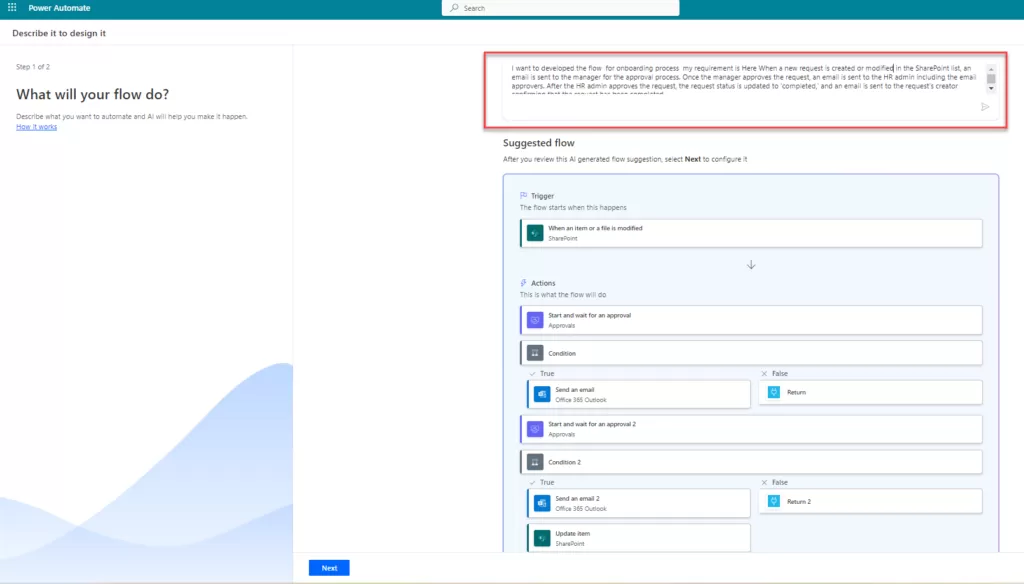
Traditionally, employee onboarding involved a cumbersome series of paperwork, manual approvals, and resource provisioning. With Power Automate, this process can be transformed into a streamlined and efficient operation. New hires can complete digital forms, which automatically trigger approval workflows. Once approved, access to systems and resources is granted automatically. This not only speeds up the onboarding process but also ensures that new employees have everything they need from day one, enhancing their experience and operational efficiency.

Power Automate doesn’t stop at employee onboarding; it extends its transformative capabilities to other critical areas. For example, organizations can leverage Power Automate for Contract Management, streamlining the creation, approval, and management of contracts. Additionally, Employee Offboarding processes can also be automated, ensuring a smooth transition when employees leave the organization. These are just a few examples of how Power Automate can be tailored to fit specific business needs, making it an invaluable asset for organizations seeking to optimize their workflows and enhance operational efficiency.

A remarkable facet of Power Automate lies in its unparalleled integration capabilities. The platform seamlessly interfaces with a myriad of tools and systems, including Microsoft Forms, SharePoint Lists/Libraries, Azure SQL, Salesforce, and a plethora of third-party applications. The result is a harmonious ecosystem where data flows effortlessly, processes synchronize seamlessly, and business operations resonate with unparalleled efficiency.

As you contemplate the transformative capabilities of workflow automation with Power Automate, explore our blog on Seamlessly Automate Your SharePoint Tasks with Power Automate to discover how this powerful duo can reshape your business processes and elevate your operational efficiency.

Embracing Workflow Automation with Power Automate

In conclusion, the era of manual and cumbersome business processes is evolving rapidly, thanks to workflow automation and Microsoft Power Automate. Businesses are now equipped to streamline operations, reduce complexities, and boost productivity. Embrace automation, leverage Power Automate’s capabilities, and propel your organization toward a more efficient and productive future.

The power of workflow automation extends beyond technology implementation; it signifies a fundamental shift in how businesses operate. With Power Automate as your ally and guided by the expertise of Reality Tech, your organization can redefine processes, unlocking unprecedented efficiency, productivity, and agility.

In a world where efficiency is paramount, Microsoft Power Automate is your gateway to a brighter, more streamlined future. Embrace automation, simplify your processes, and elevate your organization’s productivity.

SharePoint for Remote Work: Enabling Collaboration and Productivity Anywhere

The world of work has undergone a significant transformation, with remote work becoming increasingly prevalent. The need for robust collaboration tools has never been greater as organizations strive to ensure productivity and effective communication among remote teams.

In this blog, we delve into the depths of SharePoint, an exceptionally comprehensive solution that empowers seamless collaboration, boosts productivity, and enables effective remote work.

Join us as we explore the extraordinary features of SharePoint and how it can elevate team efficiency, communication, and data security, all while optimizing remote work.

The Rise of Remote Work and the Need for Robust Collaboration Tools:

img-01

As remote work becomes the new normal, organizations face the imperative to equip their teams with tools that enable seamless collaboration and productivity.

The physical distance between team members necessitates a solution that bridges the gap and fosters effective communication (without defaulting to email), efficient document sharing, and real-time collaboration.

SharePoint stands out as the go-to platform that addresses these needs and revolutionizes the way remote teams work together.

SharePoint: Enabling Seamless Collaboration and Productivity in Remote Work Scenarios:

img-02SharePoint boasts a myriad of features that empower remote teams to work collaboratively, enabling them to transcend the limitations of geographical boundaries.

With its versatile capabilities, SharePoint ensures that teams remain connected, collaborative, and productive, regardless of their physical location.

1. Co-Authoring and Real-Time Updates: 

img-03

One of the standout features of SharePoint is its ability to facilitate real-time co-authoring, enabling team members to work on documents simultaneously. This fosters a dynamic and collaborative environment where ideas flow freely, fostering innovation and collective problem-solving.

With real-time updates, every team member can witness changes as they happen, eliminating the need for endless email threads and version control headaches.

2. Document Sharing and Accessibility: 

img-04

SharePoint’s document-sharing capabilities form the backbone of efficient remote collaboration. With its intuitive document libraries and folders, teams can easily organize and categorize files, ensuring smooth accessibility and seamless sharing.

Remote team members can effortlessly retrieve information, enabling streamlined workflows and reducing time wasted searching for critical documents.

SharePoint Online extends its prowess to foster external collaboration allowing users to securely share files and collaborate with external partners, such as contractors, vendors, or clients, all while maintaining stringent data protection measures.

3. Integration with Microsoft Teams: 

img-05

To truly supercharge remote collaboration, SharePoint integrates seamlessly with Microsoft Teams, providing a unified solution that combines collaboration and communication tools.

With this integration, virtual meetings become effortless, allowing team members to connect, share screens, and collaborate on documents in real time.

Chat functionality within Teams fosters quick and efficient communication, further enhancing remote team collaboration.

4. OneDrive with Sync for Offline Work:

img-06

For those instances where connectivity may be limited, SharePoint’s integration with OneDrive offers a powerful solution.

OneDrive with Sync enables team members to continue working on documents even without an internet connection.

Changes made offline are automatically synced when the connection is reestablished, ensuring a seamless transition and uninterrupted productivity.

5. Advanced Data Security: 

img-07

In a remote work environment, data security is of paramount importance. SharePoint provides robust security measures to protect sensitive information and prevent unauthorized access.

With features such as role-based access control, encryption, and data loss prevention, organizations can rest assured that their data is safeguarded even in remote settings.

More advanced capabilities are available within Azure Information Protection (AIP) and Microsoft Purview, allowing label and policy settings for a more unified and nuanced management capability that we’ll explore in a future article.

6. SharePoint as an Intranet: 

img-08

SharePoint serves as an invaluable intranet solution, empowering organizations to create cohesive and personalized intranet portals. These centralized hubs offer a seamless gateway for employees to access important information, news, and updates.

With customizable layouts, newsfeeds, and event calendars, SharePoint’s intranet capabilities foster a sense of unity and engagement within distributed teams.

Additionally, the intranet acts as a virtual water cooler, providing a space for employees to share ideas, collaborate on projects, and build a strong sense of community, even when working from different locations.

7. Usage Analytics:

img-09

SharePoint Online equips organizations with powerful usage analytics, granting valuable insights into how the platform is utilized by remote teams.

These analytics offer a comprehensive understanding of user behaviors, content engagement, and collaboration patterns.

Armed with this data-driven knowledge, organizations can identify areas for improvement, optimize remote work strategies, and enhance overall productivity.

Usage analytics become the compass guiding organizations towards more effective remote collaboration, empowering them to make informed decisions that drive success.

8. Integration with Microsoft Search: 

img-10

SharePoint Online seamlessly integrates with Microsoft Search, a powerful cross-application search tool within Microsoft 365.

This integration delivers a unified search experience, allowing remote workers to swiftly locate information across various Microsoft 365 applications.

With a single search bar, users can access files, emails, documents, and even people, streamlining the retrieval of critical information.

This unified search capability eliminates the need for navigating multiple applications, enhancing productivity and efficiency for remote workers and ensuring that valuable time is spent on collaboration and essential tasks rather than searching for scattered information.

The potential of SharePoint in fostering effective remote collaboration is endless. Check out the Top Features and Benefits of SharePoint Online for a more comprehensive understanding of how SharePoint Online can enhance collaboration and teamwork.

Tips and Best Practices for Optimizing SharePoint in Remote Work:

To maximize the potential of SharePoint in remote work scenarios, here are some tips and best practices to consider:

  • Leverage alerts to ensure team members stay updated on critical changes and developments in real-time
  • Customize and edit basic Flow templates to automate routine tasks, freeing up time and increasing productivity
  • Create different views in lists/libraries to allow team members to view filtered data relevant to their specific roles and responsibilities.
  • Review the Office 365 tenant settings for tuning the right set of features, sharing, and control for your enterprise.
  • Create an Intranet in SharePoint so the enterprise, down to each team and department, has access to all the links, documents, events, news, and calendars needed to hit the ground running.

Understanding the advantages of transitioning to SharePoint Online and the smooth migration process can greatly contribute to optimizing your collaboration and productivity

For valuable insights and practical tips, check out Why Migrate to SharePoint Online and Tips for Migration.

SharePoint for Virtual Meetings and Communication:

In conjunction with Microsoft Teams, SharePoint serves as a powerful platform for virtual meetings and seamless communication.

Teams can conduct virtual meetings, initiate chats, and collaborate on documents in real-time, ensuring remote teams are always connected and informed.

SharePoint for Knowledge Management:

In addition to collaboration and document management, SharePoint excels as a knowledge repository.

Through features such as wikis, document libraries, FAQs, and robust search functionality, teams can capture, organize, and share valuable information.

This promotes continuous learning, enhances productivity, and empowers remote teams with a wealth of knowledge.

Optimize Your SharePoint Environment with Reality Tech:

At Reality Tech, we specialize in optimizing SharePoint environments to suit the unique needs of remote collaboration.

Our expertise spans SharePoint development, migrations, workflows, and support, enabling businesses to maximize efficiency, improve communication, and enhance the overall remote work experience.

Regardless of your physical location, Reality Tech can be your trusted partner in unleashing the true potential of SharePoint.

Conclusion:

As remote work continues to shape the future of work, SharePoint emerges as a game-changer, enabling seamless collaboration, productivity, and secure data management.

With its versatile features, SharePoint empowers remote teams to collaborate effectively, communicate effortlessly, and access critical information from anywhere.

While SharePoint offers incredible out-of-the-box functionality, selecting the right SharePoint services firm can make a significant impact on your business’s success. That’s why it’s crucial to know how to choose the ideal SharePoint services partner for your business.

However, there is more to SharePoint than meets the eye.  From aligning with unique requirements to optimizing workflows, SharePoint configuration and even customization opens doors to endless possibilities, helping you tailor your SharePoint environment to meet business needs.

Partnering with Reality Tech ensures that your SharePoint environment is fine-tuned to drive success, regardless of physical location. Embrace SharePoint and revolutionize your remote work experience.


Ultimate Guide to Microsoft Purview: Revolutionizing Data Governance and Compliance

In this data-driven era, organizations face a significant challenge – managing and safeguarding their vast and diverse data assets while adhering to strict regulatory requirements. As data grows exponentially, so does the complexity of ensuring its security and compliance.

 Enter Microsoft Purview, a game-changing data governance and compliance platform designed to provide organizations with a unified view of their data estate, revolutionizing the way businesses handle data.

With its powerful suite of features and cutting-edge technology, Purview offers a holistic and proactive approach to data governance, helping businesses unlock insights, secure sensitive information, and streamline compliance processes.

Let’s explore the potential of Microsoft Purview and how it can transform the landscape of data governance and compliance within your company.

What is Microsoft Purview?

img-01

Microsoft Purview is a powerful data governance and data management tool offered by Microsoft. It provides businesses with a comprehensive solution to discover, classify, and manage their data assets across various sources, both within their organization and in the cloud.

With Purview, businesses can gain valuable insights into their data, understand its lineage, identify sensitive information, and ensure compliance with data regulations.

This enables organizations to make informed decisions, protect their sensitive data, and drive efficient data-driven processes throughout their enterprise.

By providing a unified view of data across the organization, Microsoft Purview empowers businesses to harness the true potential of their data, transforming it into a strategic asset for growth and success.

Benefits of Microsoft Purview:

  1. Holistic Data Visibility:

img-02

Gaining a comprehensive and centralized view of the entire data estate is a crucial advantage offered by Microsoft Purview. Businesses can now gain invaluable insights into data sources, relationships, and usage patterns.

This enhanced visibility enables data-driven decision-making and optimizes data management strategies, leading to enhanced efficiency and productivity.

  1. Proactive Insider Risk Management:

Understanding and mitigating insider threats are critical components of data security. Microsoft Purview actively monitors user activity to detect suspicious behavior patterns, allowing organizations to proactively address potential risks and ensure data security.

  1. Integration Capabilities:

Purview seamlessly integrates with a range of business applications, including SharePoint, Salesforce, Outlook Calendars, SQL Server, Teams, and Planner, enhancing automation capabilities and streamlining data workflows.

Key Features of Microsoft Purview:

  1. Automated Data Classification:

img-03

Accurate identification and classification of sensitive data are essential for data protection and compliance. With Purview, organizations can seamlessly identify and classify data based on predefined policies or custom criteria, ensuring regulatory compliance and bolstering data security.

Leveraging the power of AI and ML, Purview automatically classifies data based on sensitivity, risk, and content, streamlining the data classification process for efficient data protection and compliance.

img-04

  1. Intelligent Information Protection:

Purview empowers organizations to enforce data protection policies on sensitive data, preventing unauthorized access and safeguarding sensitive information from unauthorized disclosure.

With information protection, businesses can now benefit from sensitivity labels that offer seamless classification and protection of their valuable data without compromising productivity and collaboration.

Purview enables organizations to apply granular protection policies to sensitive data, ensuring that data remains secure and accessible only to authorized personnel.

Using sensitivity labels, users gain the ability to:

  • Apply encryption and content markings to secure documents and emails.
  • Safeguard content in various Office apps on different platforms.
  • Protect content in third-party apps with Microsoft Defender for Cloud Apps.
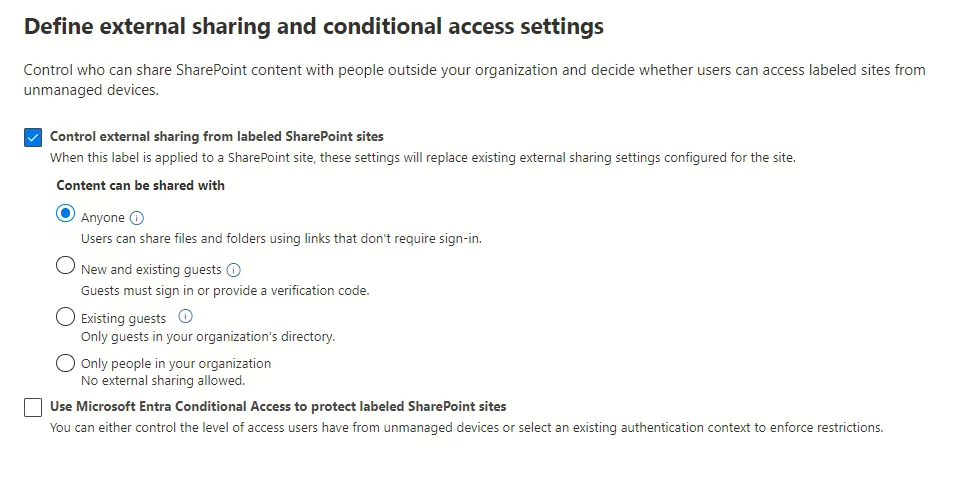
  • Secure containers like Teams, Microsoft 365 Groups, and SharePoint sites with privacy settings.
  • Label and encrypt meeting invites and chat in Teams for added protection.
  • Extend sensitivity labels to Power BI and Microsoft Purview Data Map to protect data beyond the service.
  • Enable third-party apps to read sensitivity labels and apply protection settings.
  • Label content to indicate sensitivity levels and generate usage reports.

What’s more, the versatility of sensitivity labels allows organizations to extend their protective reach to secure containers such as Teams, Microsoft 365 Groups, and SharePoint sites with privacy settings.

Even meeting invites and chats in Teams can be labeled and encrypted for added protection.

  1. Comprehensive Insider Risk Management:

Microsoft Purview’s advanced analytics and behavior monitoring capabilities proactively identify insider threats, empowering organizations to take swift action to mitigate risks and protect their data.

Purview’s Insider Risk Management feature provides detailed insights into user activities, helping organizations understand patterns that may indicate malicious intent or security vulnerabilities.

With this valuable information, businesses can implement targeted security measures, such as additional authentication steps or temporary access restrictions, to prevent potential data breaches.

  1. Effortless Content Search:

Microsoft Purview simplifies data retrieval and auditing processes with its powerful content search capabilities. Whether for auditing or eDiscovery purposes, Purview allows businesses to quickly search and retrieve specific data sets or files across various sources.

The intuitive search interface enables users to pinpoint relevant information effortlessly, saving valuable time and effort in data discovery.

  1. Data Loss Prevention:

Data security is a top priority for businesses, especially when dealing with sensitive information. Microsoft Purview’s Data Loss Prevention (DLP) features empower organizations to implement robust policies and controls to prevent the unauthorized disclosure or loss of sensitive data.

With Purview’s DLP, businesses can proactively safeguard their valuable data assets, ensuring compliance with data protection regulations and maintaining customer trust.

  1. Seamless Compliance with Communication Policies:

Communication compliance is a crucial aspect of data governance. With Purview, businesses can effectively monitor and enforce compliance with communication policies across various channels, such as emails and chats, promoting a secure and compliant data environment.

  1. Enhanced Information Barriers:

To maintain data integrity and prevent conflicts of interest or inappropriate access, businesses can leverage Purview’s Information Barriers feature.

This capability enforces a separation between certain users or groups, limiting data access based on defined policies.

By effectively controlling data flow, organizations can enhance security and minimize the risk of unauthorized data exposure, ensuring data stays in the right hands.

  1. Streamlined Record Management:

Practices

img-05

Compliance with regulatory requirements is crucial for businesses, especially when it comes to managing records and documents. With Purview, users can create retention labels that can be applied manually or automatically, providing flexibility and control over data retention.

To get started with retention labels, users first need to create a label definition that outlines the specific retention settings for the label.

Once the label definition is created, it can be published. Users have the option to apply the label manually by selecting the content they want to label and choosing the appropriate label from the list of available options.

img-06

Moreover, Purview offers the capability to apply labels automatically using auto-apply policies, streamlining the process further. Users can create custom auto-apply policies that specify conditions that must be met for the label to be applied automatically.

For instance, an auto-apply policy can be configured to apply the label to all documents created in a specific location or containing particular keywords.

But it doesn’t end there—Purview also provides Disposition Review, a crucial process for deciding what to do with old records after their retention period has expired.

During disposition review, users can extend the retention date, relabel, add reviewers, or dispose of records. This process ensures that records are managed and disposed of in accordance with your organization’s policies and procedures, promoting compliance and avoiding regulatory fines and penalties.

  • Compliance: Disposition review ensures that records are managed and disposed of in accordance with your organization’s policies and procedures.
  • Efficiency: With efficient disposition review, you can optimize your data storage and utilization. By disposing of old or unnecessary records, you can reduce the amount of storage space needed for your data.
  • Enhanced Data Security: Protecting your records from unauthorized access, modification, or deletion is vital for data security. Disposition review in Microsoft Purview allows you to identify records that may be at risk and implement appropriate security measures to safeguard sensitive information.
  1. Simplified eDiscovery:

Legal and compliance requirements often necessitate rapid data retrieval. eDiscovery, a powerful feature of Microsoft Purview, greatly enhances the efficiency and effectiveness of legal proceedings and compliance audits.

Purview streamlines the eDiscovery process, enabling organizations to quickly identify and retrieve relevant data sets and files.

With eDiscovery, you can automate the identification and application of legal holds to relevant data, ensuring that critical information is preserved and protected for legal purposes.

The feature also provides a variety of tools to help you search for relevant data, including keyword searches, date ranges, and custodian filters. You can also use predictive coding to help identify the most relevant data swiftly and accurately.

Moreover, eDiscovery makes it seamless to export relevant data from your eDiscovery case in various formats such as PDF, CSV, and XML, making it convenient to share information with legal teams or regulatory authorities.

  1. Robust Audit Trail:

Staying on top of user activity and system events is vital for compliance and security purposes. Microsoft Purview’s audit capabilities allow businesses to track and report on user interactions with data and system events.

This valuable insight helps organizations identify potential risks, monitor data usage patterns, and ensure adherence to data security and compliance policies.

With Purview’s auditing features, businesses can maintain transparency and accountability in their data management practices.

  1. Effective Data Lifecycle Management:

Microsoft Purview offers robust data lifecycle management, ensuring effective data management from creation to disposal. Retention policies can be created from the Data lifecycle management catalog.

These policies allow organizations to manage the lifecycle of data in various locations, providing centralized data governance. You can apply a single policy to multiple locations or specific ones, with the retention period based on content creation or modification dates.

When items are moved outside their specified container, a copy is retained in a secure location, but the retention settings do not travel with the content.

For that purpose, retention labels should be used instead. Microsoft Purview’s data lifecycle management empowers organizations to streamline data retention, enhance compliance, and maintain responsible data stewardship.

Overcome Microsoft Purview Implementation Challenges with Reality Tech

During the implementation of Microsoft Purview, organizations may encounter challenges, issues, or limitations. Licensing costs, configuration challenges, performance issues, administrative access limitations, and reporting needs must be carefully evaluated and addressed to ensure a seamless deployment.

With Reality Tech’s proven experience and deep understanding of Microsoft Purview, businesses can confidently navigate these challenges and unlock the full potential of this powerful data management solution.

Our team of experts stands ready to assist you at every step, ensuring a smooth and successful implementation that meets your unique business needs.

Also, if you are looking to ensure comprehensive compliance across your organization, check out Microsoft Purview Compliance Manager, where we delve into how this powerful tool can help you achieve regulatory compliance and streamline your compliance management processes seamlessly.

Discover the perfect duo of Microsoft Purview and Purview Compliance Manager to revolutionize your data governance and compliance strategies.

In conclusion, Microsoft Purview empowers organizations to transform their data governance and compliance strategies, driving data insights, enhancing data protection, and ensuring adherence to regulatory standards.

As a trusted partner, Reality Tech leverages its expertise to assist organizations in harnessing the full potential of Microsoft Purview.

With a focus on streamlining workflows, optimizing efficiency, and ensuring compliance, Reality Tech enables businesses to unleash the true power of Purview, taking your data governance and compliance practices to new heights of success.

Embrace Microsoft Purview and revolutionize the way you manage and protect your data estate.

Creating A Custom Site Template in SharePoint Online

Summary

In this blog post, I share the steps for creating the custom template for any SharePoint Online site — an essential capability if you’re customizing your SharePoint development solutions for scalable collaboration and branding.

Now let’s start building the custom template, for which we will run the following commands.

Step 1

First, create a SharePoint site. If you’re new to the platform or wondering why it’s worth using, start with this guide on SharePoint Online benefits for collaboration and teamwork.

Step 2

Install “SharePoint Online Management Shell” and open as “Run as Administration”


img-01

Step 3

Connect the SharePoint tenant using the following command. Make sure your connection setup aligns with SharePoint security best practices — especially if your template will be deployed across sensitive business environments.

Tenant Admin Url – https://anyorganization-admin.sharepoint.com/

Connect-SPOService -url “Tenant Admin Url”

Step 4

Execute the command below for creating the theme according to the requirements.
$themepallette =@{
"themePrimary"="#9b59b6";
"themeLighterAlt"="#faf7fb";
"themeLighter"="#f5eef8";
"themeLight"="#ebdef0";
"themeTertiary"="#d5b9e0";
"themeSecondary"="#a569bc";
"themeDarkAlt"="#8e4ba8";
"themeDark"="#6e3a83";
"themeDarker"="#572e67";
"neutralLighterAlt"="#f8f8f8";
"neutralLighter"="#f4f4f4";
"neutralLight"="#eaeaea";
"neutralQuaternaryAlt"="#dadad";
"neutralQuaternary"="#d0d0d0";
"neutralTertiaryAlt"="#c8c8c8";
"neutralTertiary"="#d6d6d6";
"neutralSecondary"="#474747";
"neutralPrimaryAlt"="#2e2e2e";
"neutralPrimary"="#333333";
"neutralDark"="#242424";
"black"="#1c1c1c";
"white"="#ffffff";
"primaryBackground"="#ffffff";
"primaryText"="#333333";
"bodyBackground"="#ffffff";
"bodyText"="#333333";
"disabledBackground"="#f4f4f4";
"disabledText"="#c8c8c8";
}

Add-SPOTheme -Name “Test Purple” -Palette $themepallette -IsInverted $false Here we can provide the theme’s name based on requirements.

Step 5

Now we’ll initialize the previously created theme and site logo. If you’re migrating from a legacy system, this is a great way to unify branding after a file share to SharePoint Online migration.

$site_script=@'
{
"$schema":"schema.json",
"actions":[
{
"verb":"applyTheme",
"themeName":"Test Purple"
},
{
"verb":"setSiteLogo",
"url":"Site Logo Url Path"
}
],
"bindata":{ },
"version": 1
}
'@

Here, we replace the “Site Logo Url Path” with the link, where it is located in one of the document libraries.

Step 6

Run the below command to return the ID
	
Add-SPOSiteScript -Title "TestSite" -Content $site_script -Description "Creates Test Site Script"

Here, you can change the Title and Description based on the requirements.

Step 7

	
Add-SPOSiteDesign -Title "TestSite" -WebTemplate "68" -SiteScripts "ID" -Description "Test Site"

Step 8

Now open existing the SharePoint site which we created in site tenant, we click on gear icon, then click on “Apply a site template”.

img-02

Step 9

Go to “From your organization” and you can see your created customized template and use this template in the site.

img-03

Step 10

After selecting the template click on “Use template”. It can take a few times for apply template apply the template the the site.

img-04

I hope, this article will help you in building for your app.

In summary, we’ve created a custom site template in SharePoint that brings consistent branding and configuration across your organization. For tailored implementation or help managing permissions, themes, or automation, check out our SharePoint development services.

Hope this helps!!  Happy SharePointing!

Confluence to SharePoint Migration – Step by Step Guide

As businesses grow, the need to store, secure, and manage crucial information becomes increasingly important. Microsoft SharePoint is a cloud-based system that has gained a reputation for being a reliable and powerful tool to meet collaboration needs.

With enterprises discovering that SharePoint comes included with their Microsoft Office licenses and seamlessly integrates with Active Directory, migrating from legacy systems to SharePoint has become an attractive option to consolidate intranet and collaboration information.

If you are currently using Confluence as your system for wiki-based corporate reference information, transitioning to Microsoft SharePoint might be a wise choice.

In this article, we offer insights into a smooth and successful Confluence to SharePoint migration.

Benefits of Confluence to SharePoint Migration? 

There are a range of benefits to SharePoint over Confluence that are worth exploring.  Let’s consider some of the benefits:

1: Effortless Integration

SharePoint, as part of Microsoft 365, offers incredible integration with other Microsoft applications, like Microsoft Outlook, Teams, OneDrive, and Office.

This means smoother collaboration, higher productivity, and better shared access to files and documents.

For example, access to documents shared on Teams via SharePoint and OneDrive accounts, alerts, tasks, versioning, and approval workflows become available to team members.

2: Enterprise-grade Features

Enterprise-level features like search, customizable workflows, advanced security and permissions, and integration with other Microsoft tools are offered by Office 365 in general and SharePoint in particular

3: Flexibility and Scalability

Being highly flexible, SharePoint allows for customization according to business needs and processes.

In addition, it boasts excellent scalability, ensuring that vast data shared by users can be accessed across geographical locations, devices, and browsers without requiring third-party tools.

Metadata can be centrally defined across the organization, ensuring organization-wide search capabilities.

4: Support and Community

With an enormous user community and support resources, technical and support issues quickly and efficiently.

An array of online communities, online user group channels, forums, and online documentation are all available to seek quick and effective resolutions to issues, with a range of vendors offering Microsoft product support.

Additional Read

SharePoint for Enterprise Content Management – Why Should Choose?

Steps For Confluence to SharePoint Migration

Step 1: Documenting the Information Architecture

We start by analyzing the file types and sizing, including wiki pages and their relationship to corporate divisions and departments.

We define the site hierarchy, structures, and metadata, as well as any necessary features, customizations, and workflow.

Finally, the correct permissions are required for exporting from Confluence and uploading to SharePoint, with security being a critical dimension of the information architecture and its alignment with Active Directory.

Step 2: Choose the Right Migration Tool for Your Business

Choosing a migration tool that meets specific business requirements is essential for a seamless migration.

We consider factors like whether the Confluence instance is migrated from a cloud, server, or data center.

Data size, space requirements, and throughput all need to be evaluated to decide whether cloud or on-premises migration tools are required.

Customizable migration tools using configuration and mapping options are recommended for hassle-free migration.

In migrating a large dataset from Confluence, we would want a customizable migration tool for hassle-free migration that allows for a maximum of options and mappings and configuration for an optimal migration.

Additional Read

How to Choose the Right SharePoint Migration Tool and Service Partner?

There are advanced options and capabilities to consider, such as URL redirection, that can allow existing legacy URLs to be handled seamlessly going forward so embedded links can still work post-migration in SharePoint.

Step 3: Mapping

Metadata must be selected to preserve from the source and how each field will map to the destination.

Mapping subsets of content, such as departmental content, to structures in the destination lets us refine migration to compensate for organic growth at the source.

Select content can be excluded from migration to only migrate the latest and most relevant content, allowing select fields to be mapped, including “Creator,” “Creation Date,” Editor, Author, timestamps, and other fields.

Step 4: An initial migration

Load the initial dataset from Confluence to SharePoint for consideration. Mapping is refined iteratively, and objects are mapped for optimal usability in the destination.

Once the initial migration is complete, even for just one department, delta migrations and cutover can be done.


Step 5: Delta Migration to SharePoint

Using a sophisticated migration tool to identify what was already migrated and what is remaining for migration becomes necessary in a delta migration. Mappings are crucial for data subsets in a usable format on the destination.

The mapping is the key, so each type of content at the source is mapped to a usable type of content on the destination, with the result being coherent and usable by end users. Note that migrating pages from Confluence takes effort.

Step 6: Train users for quick adoption

To ensure quick adoption of the new productivity platform, training users is crucial. Training resources are tailored to meet specific business requirements, with 1-1 training, group training, how-to-reference guides, and other approaches, including “Train the Trainer.”

Training for in-house support and administrators is also essential. Consequently, you need to determine suitable training resources for your organization.

Conclusion

Confluence to SharePoint migration is a stride towards consolidating business systems, centralizing control, and management of information.

Enhanced productivity, successful collaboration, and efficient data management can be achieved with SharePoint’s enterprise-grade features.

When you opt for migration, hire an experienced partner for seamless migration and training.

A dedicated team can help plan and execute a successful migration while providing training to ensure effortless platform adoption by users.

New SharePoint Feature: External File Requests

SharePoint External File Requests

With SharePoint, one can now request external files quickly and easily. The feature initially surfaced first back in 2019 within OneDrive. It is now available in SharePoint as well.

This out-of-the-box feature allows users to request and collect files from anyone inside or outside the organization quickly and securely.

With file requests, one can request documents from anyone, irrespective of whether they have access to your SharePoint document libraries or other sites.

The file request link can be included in a range of communication channels, including email signatures, chats, and your intake or onboarding procedures with customers, prospects, and vendors.

The procedure is quick and straightforward for the recipient. They receive a link and upload the file via browser, and the file is then stored in SharePoint.

This feature improves overall collaboration and streamlines processing. File sharing in this manner gives users a simple and secure way to upload files without compromising access or requiring permission changes.

The result is fewer files being emailed and a reduced load on email recipients extracting the file from the email and uploading to a specific SharePoint location.

How SharePoint External File Requests Help My Enterprise?

This easy and secure way of collecting files from anyone and everyone is beneficial for organizations as it leads to smoother and better collaboration and faster business processing and automation with no code and less user interaction and manual filing effort.

1. Greater Collaboration:

The file request feature allows for streamlined collaboration and sharing with external users.

It enables organizations and their employees to collect files easily from clients, customers, and vendors in a controlled and secure manner while enhancing the coordination, communication, and collaboration processes.

2. Simplified File Collection: 

This feature enables a smoother and more secure file collection process that is easy and simple for users.

It has an extremely easy, user-friendly web interface for recipients to upload files while avoiding the requirements for complicated and time extensive file transfer methods that might entail licensing or additional credential management.

3. End-to-End Data Security: 

Apart from easy file sharing, it also ensures end-to-end data security and control, ensuring that external users can only upload files to a specific folder that they want and does not grant access to the folder or library to the user.

It mitigates the risk of unauthorized access to sensitive information and maintains the security of your SharePoint document libraries.

To prepare for using the file request feature in SharePoint Document Libraries, here are some of the considerations that should be kept in mind- 

  • To enable such file transfers, ensure that the administrator enables the file request feature at the tenant level.  You can enable this configuration using the SharePoint Online Management Shell.
  • Configure the required permissions for links, with specifications related to the appropriate levels of view, edit, and upload permissions for external users.
  • Inform your user base of this capability and how to utilize it.
  • Users should receive some guidance, instructions, or cheat sheets for making file requests and managing the files they receive using this functionality.
  • Ensure desktop support staff is aware of this newly enabled function and are ready to provide support and guidance on its use.

By taking into account the configuration, management, and use, you can get the most out of SharePoint Online’s file request capability and benefit from streamlined file collecting and collaboration while ensuring data protection and control.

Step-by-step Guide for External File Sharing in SharePoint Online

We will be listing the 10-step comprehensive guide for external file sharing in SharePoint Online. Have a look at it and get started for easy and quick file sharing.

1. Enable Guest Sharing:

The very first step is enabling guest sharing in your SharePoint architecture. The site owners or, more likely, the administrators can do it using the SharePoint Online Management Shell.

Change the Sharing Settings as below by going to SharePoint Admin Center > Policies > Sharing

img-01

You can set up the OneDrive settings as – New and existing guests and Anyone for SharePoint and can still enable the feature.

After setting these up, check that OneDriveRequestFilesLinkEnabled is set correctly via SharePoint Online Management Shell.  Here are the commands (substitute your tenant domain, of course):

img-02

  • For OneDrive
    • Check if CoreRequestFilesLinkEnabled is set to True. If it isn’t set to True, run Set-SPOTenant -CoreRequestFIlesLinkEnabled $True.
    • If this is set to True, the Request files link on the core partition for all SharePoint sites is enabled (not including OneDrive sites). If this value isn’t set, Request files will only show for OneDrive with Anyone links enabled.

2. Choose a Folder: 

After that, choose the folder in SharePoint where you want the recipient to place the requested files. This folder collects the files uploaded by the recipients.

In SharePoint, the option appears as:

img-03

In OneDrive, the option appears as:

img-04

3. Request Files: 

Once you’ve selected the folder, click on the “Request Files” option to initiate the file request.

Additional Read

Top Features and Benefits of SharePoint Online for Collaboration and Teamwork

4. Fill out the Details: 

You need to add the necessary details, such as the name of the folder which you will use to collect the requested files. Make sure that the name of your folder is easy to find as well as descriptive.

A popup comes up to add the information:

img-05

5. Enter the Recipient’s Email: 

Then, add the email address of the person you want to request files from to enable file requesting.

img-06

6. Sending the Request: 

After you get the recipient’s email, then you can send the file-sharing request option to the recipient. You can send a unique link or email directly from the SharePoint user interface.

img-07

7. Uploading Files:

The recipient will receive the file request and click on the link provided in the email. They will be directed to a web page with a simple browse and upload experience. The recipient can select the files they want to upload and submit them.

When the recipient clicks on the link, the following page is displayed,

img-08

Once the user clicks “Select Files”, File Explorer opens up to select files.

img-09

Once the files are selected, click on Upload to upload the files to the folder.

Once uploaded, the documents come up like this:

img-10

Here’s A Disclaimer – 

The file request feature allows users to only upload files. They cannot view, edit, or see files uploaded by others or any other content in the SharePoint environment.

That’s good news, as the process is naturally secure, restricting your designated user to simply uploading file(s).

1. Email Alerts: 

Once the recipient uploads files, you will receive an email notification about the update. The email contains all the information regarding the updated files and even the person who uploaded them.

2. Repeat for Multiple Requests: 

You can repeat this process for multiple recipients or file requests. Each recipient will have a unique file request link or email.

3. Manage Files Seamlessly: 

As the requestor, you can access the folder where the requested files are being collected. You can view and manage the uploaded files as needed seamlessly.

Quick Tip – 

You can also consider assigning a common folder for broader file requests, such as a SharePoint document library.

This way, you can use the file request link within your email signature, making it easier for people to send you files by simply clicking on the hyperlink.

That’s it! You’re now ready to start using the file request feature in SharePoint.

Conclusion

In conclusion, the file request feature in SharePoint offers numerous benefits and provides a convenient solution for collecting files from external parties.

With our simple step-by-step guide, you can easily set up file requests and streamline the process of gathering documents from various sources.

This feature is highly versatile, and you can easily use it in various situations, such as collecting bids for a Request for Proposal (RFP), gathering assignments from students, soliciting feedback from team members, accumulating media files from an event, etc.

When you are looking to implement file requests, it is crucial to ensure that guest sharing is enabled in your SharePoint environment and that the appropriate folder is selected for collecting the requested files. With clear instructions, you can facilitate a smooth and seamless process.

We hope that by following the step-by-step guide outlined in this blog, you can start leveraging the file request feature in SharePoint to simplify file collection, improve collaboration, and enhance productivity.

Start Your Project in a Click

Our technology and wide delivery footprint have created billions of dollars in value for clients globally and are widely recognized by industry professionals and analysts.


So, What Are You Waiting For?

Start leveraging this powerful feature today and experience the benefits of efficient file collection and collaboration with SharePoint.

If you are looking for further guidance to enable smooth collaboration with SharePoint Online, then reach out to Reality Tech. Our team of experts is glad to assist.