




Microsoft 365 Copilot and AI-enabled agents are changing everyday work, from finding information and preparing content to reviewing documents and supporting business workflows.
But turning on AI capabilities is only the beginning.
Organizations must also set boundaries around the information Copilot may access, the sources agents can use, the tasks automated tools may perform, and the oversight applied to AI activity.
Without a defined AI governance framework, these technologies can bring existing Microsoft 365 risks into sharper focus, including:
- Overly broad access to SharePoint content
- Duplicate, obsolete, or unverified documents
- External sharing that is not actively managed
- Sensitivity labels applied inconsistently
- AI agents with no accountable owner
- Insufficient insight into how AI is being used
- Inadequate human approval and review safeguards
The purpose of AI governance is not to create barriers to adoption. It is to put the right security measures, responsibilities, and operational safeguards in place so that AI can be used with confidence.
Why Governance is Essential for Microsoft 365 AI?
Microsoft 365 Copilot works within the Microsoft 365 permissions already assigned to the person making a request.
It does not inherently bypass or override security permissions in SharePoint, Teams, OneDrive, or Exchange. However, it can make information that a user already has permission to access much easier to discover and retrieve.
For example, a file in a long-forgotten SharePoint site may have been accessible to an employee for years without ever being noticed. With Copilot, information from that file could surface in a useful summary almost immediately.
That shift in visibility raises four questions that every governance strategy should answer.
| Governance area | Key question |
| Access | Can the user open the information? |
| Discovery | Can Copilot or an agent surface it? |
| Processing | Can AI use it to generate a response? |
| Action | Can an agent update a system or start a process? |
A well-designed governance framework accounts for each of these checkpoints.
How a Microsoft 365 AI Governance Architecture Fits Together?
An effective architecture brings together the people using AI, their Copilot and agent experiences, connected organizational information, protective controls, and ongoing reporting.
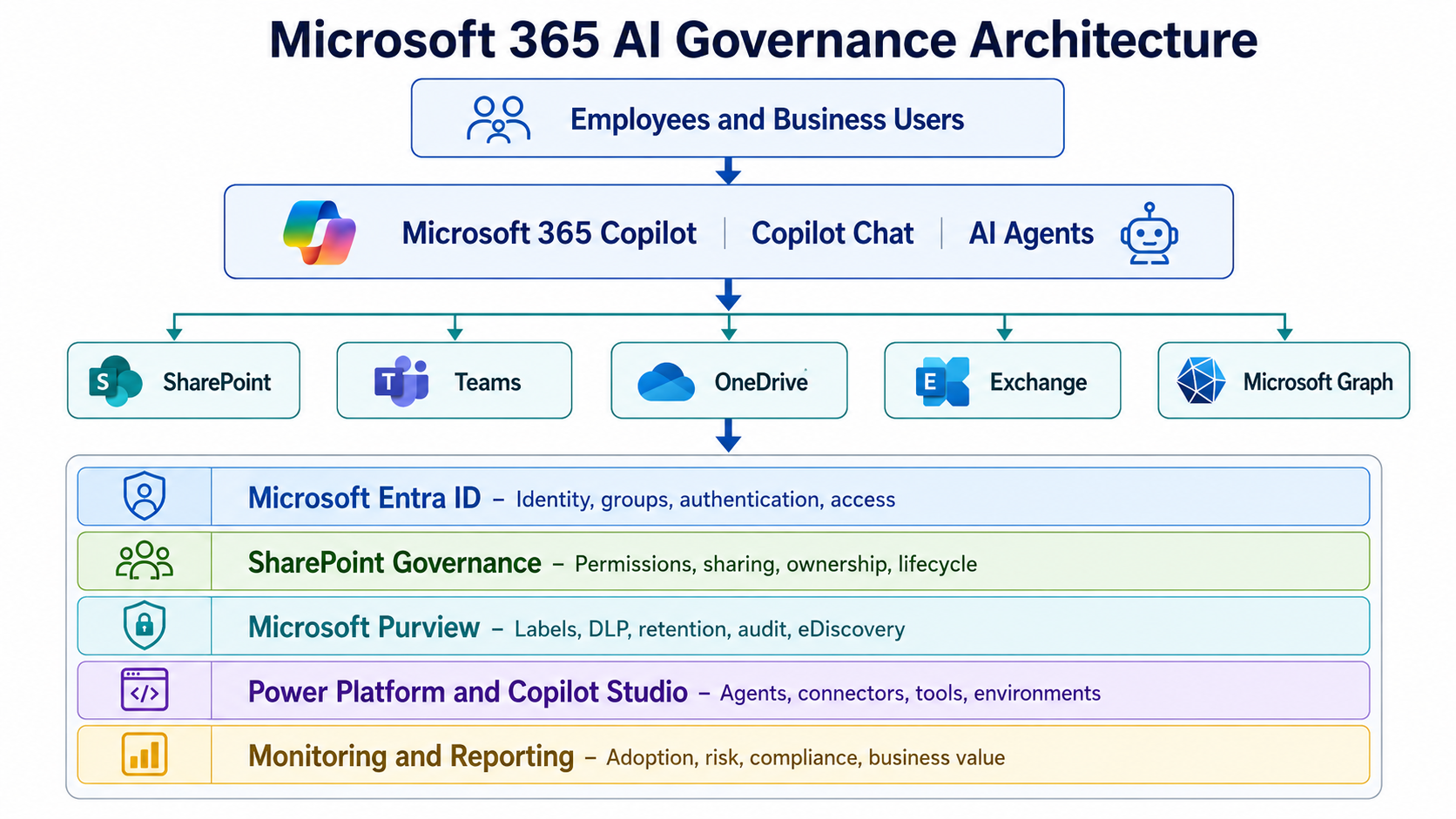
The central design principle is simple: governance needs to be built into every layer of the AI experience, not handled as a disconnected compliance exercise.
1. Manage Identities, Access, and Sharing
Access management is still the starting point for protecting Microsoft 365 information in AI scenarios.
Governance reviews should regularly examine:
- Who belongs to each SharePoint site
- Permissions assigned through Microsoft Teams
- Access granted to external users
- Guest accounts and the rights they retain
- Anonymous links and links shared across the organization
- Sites that no longer have an active owner
- Sensitive libraries with unique or inherited-permission exceptions
- Inactive sites that continue to hold organizational information
The highest priority should be SharePoint locations where sensitive material is combined with broad access.
The following risk-based approach helps determine the response:
| Information sensitivity | Access level | Required response |
| Sensitive | Broad | Remediate excessive access immediately |
| Sensitive | Restricted | Verify that existing protections remain effective |
| Lower sensitivity | Broad | Confirm that the level of sharing is justified |
| Lower sensitivity | Restricted | Continue routine access reviews |
This is not about eliminating collaboration or external sharing. The goal is to make access deliberate, appropriate, and subject to regular review.
2. Protect Information and Improve Content Reliability
The usefulness of an AI response depends heavily on the accuracy and reliability of the content it draws from.
Copilot does not independently verify that every source document is the official version, still current, free of duplication, or approved for continued use.
Organizations therefore need clear practices for:
- Assigning responsibility for business content
- Setting document review and expiry schedules
- Approving information before publication
- Applying consistent metadata
- Defining understandable information categories
- Archiving content according to established rules
- Identifying trusted locations for organizational knowledge
- Retiring information that is outdated or no longer valid
Sensitivity labels should complement these practices by indicating the protection required for each type of information.
| Classification | Example | AI approach |
| Public | Published information | Standard processing |
| Internal | General procedures | Available to authorized users |
| Confidential | Financial or client information | Apply protection and monitoring |
| Highly Confidential | Legal, HR, or regulated data | Restrict access and consider excluding from AI processing |
An overly ambitious starting point is to insist that every document must be classified before Copilot can be introduced.
A more workable strategy focuses first on content with the greatest business value or exposure risk, then extends the controls in phases.
3. Apply Microsoft Purview Safeguards
Microsoft Purview offers a range of capabilities that help organizations govern and protect information involved in Microsoft 365 Copilot and Copilot Chat experiences.
Important capabilities to consider are:
- Sensitivity labeling for information protection
- Data Loss Prevention (DLP) policies
- Retention and information lifecycle policies
- Audit logging and review
- eDiscovery capabilities
- Insider Risk Management
- Communication Compliance
For instance, an organization might use DLP to restrict Copilot from processing documents assigned a Highly Confidential sensitivity label.
- Policy location: Microsoft 365 Copilot and Copilot Chat
- Policy condition: Sensitivity label is Highly Confidential
- Policy action: Stop Copilot from processing the matching content
A separate policy could also detect sensitive information submitted within user prompts.
| Condition
Prompt contains passport details, bank account information, health information, or a custom sensitive information type. Action Prevent Copilot from processing the prompt. |
Guidance for Rolling Out DLP
Rather than enforcing every DLP rule immediately, follow a controlled deployment sequence:
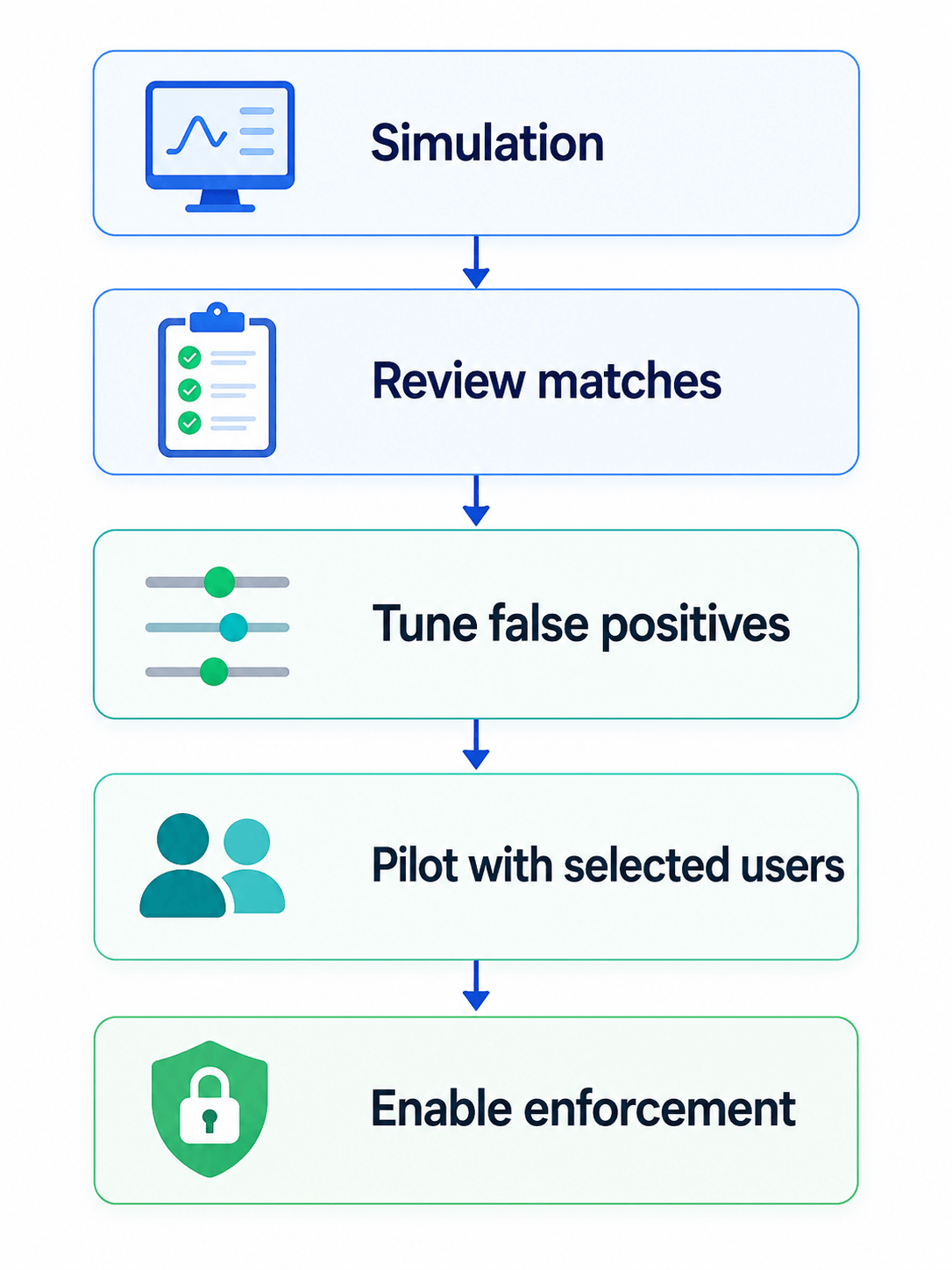
Administrators should evaluate likely effects on everyday work before applying wide-ranging restrictions.
DLP is one part of a broader defense. It works best alongside appropriate permissions, labels, encryption, endpoint protections, and employee awareness.
4. Govern Agents, Integrations, and Connectors
A complete governance model must cover more than the standard Microsoft 365 Copilot experience.
Other technologies that need review and oversight include:
- Agents built with Copilot Studio
- Agents created for SharePoint
- Agent-driven flows in Power Automate
- Connectors for Microsoft 365
- Custom-built connectors
- APIs used by AI solutions
- Knowledge repositories outside Microsoft 365
- Service accounts and other non-user identities
Every agent released into production should have a documented record of its purpose, access, owner, controls, and review cycle.
| Field | Required information |
| Business purpose | What problem does the agent solve? |
| Business owner | Who is accountable? |
| Technical owner | Who supports the solution? |
| Audience | Who can use the agent? |
| Knowledge | Which sources can it access? |
| Actions | Which tools, flows, or APIs can it invoke? |
| Identity | Which connection or service account is used? |
| Human review | Which actions need approval? |
| Environment | Development, test, or production |
| Review date | When will it be revalidated? |
Real Life Example: An HR Policy Agent with Defined Guardrails
Imagine an HR assistant designed to explain employee leave entitlements, benefits information, and internal workplace policies.
In a poorly controlled implementation, the agent is connected to an entire HR SharePoint site, with instructions alone expected to prevent disclosure of private material.
A stronger design gives the agent access to published HR policies while keeping confidential employee records in separate, restricted locations.
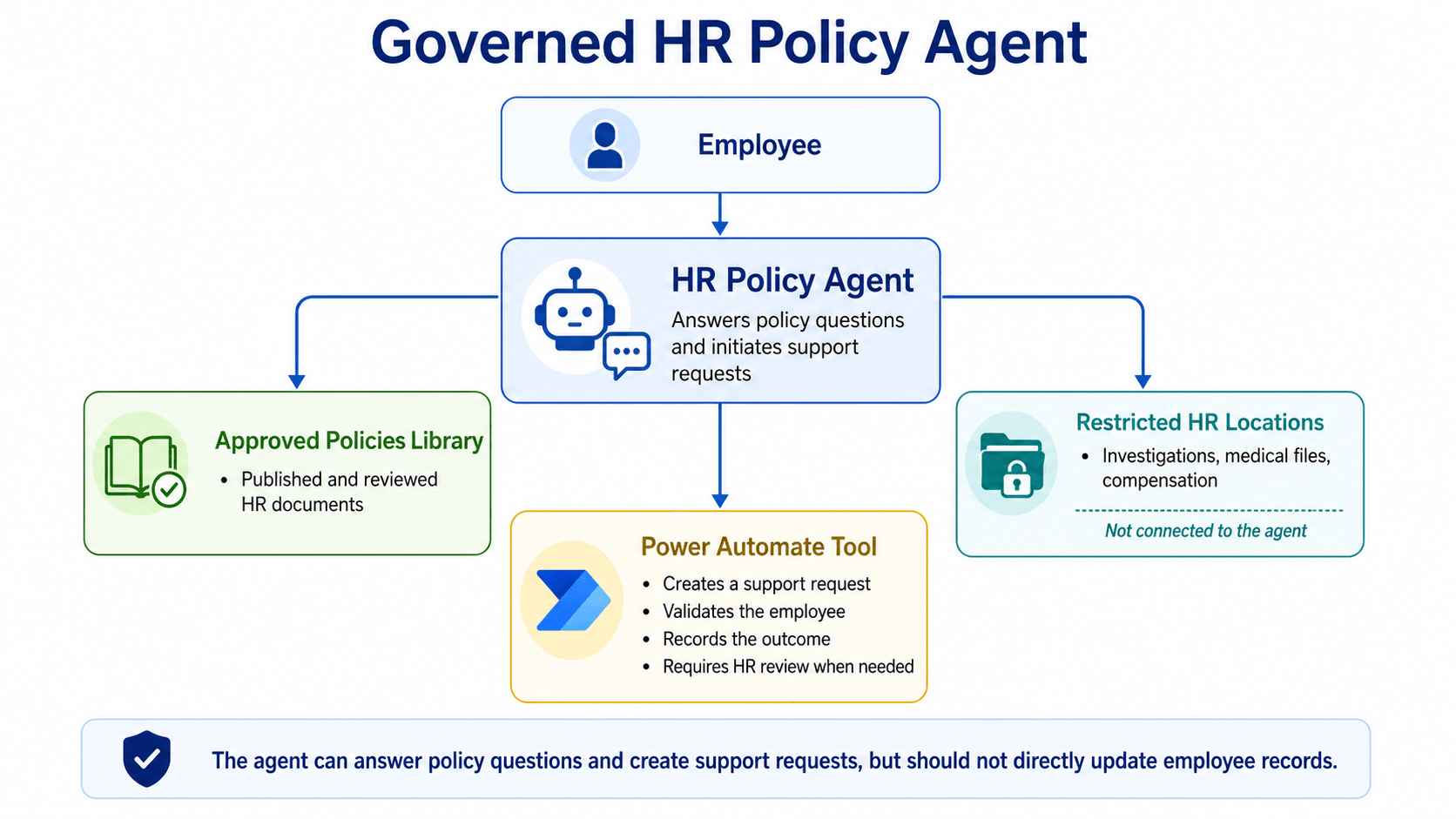
Figure 5: A governed HR agent using approved policies while protecting restricted employee records.
The agent can answer policy questions and create support requests, but must not edit employee records or make employment decisions.
This enables helpful self-service while maintaining clear limits around sensitive HR processes.
Common Pitfalls in AI Governance
Expecting Copilot to Correct Existing Access Problems
Copilot inherits existing access; it cannot fix excessive permissions.
Waiting for a Perfectly Clean Tenant Before Starting
Prioritize sensitive, high-value content rather than cleaning every file first.
Enforcing DLP Rules Before Testing Them
Simulate DLP policies and review matches before enforcement to avoid false positives and disruption.
Applying Restrictive Labels Too Broadly
Overusing the Highly Confidential label can needlessly restrict valuable Copilot scenarios.
Releasing Agents Without Clear Accountability
Each agent needs an identified owner, support arrangements, scheduled reviews, and a process for eventual retirement.
Treating License Counts as Proof of Success
Provisioning Copilot licenses does not demonstrate that employees are realizing value from AI.
Adoption reporting should also measure operational improvements, for example:
- Less time spent searching for information
- Shorter turnaround times for cases and requests
- More helpful and accurate responses
- Fewer repetitive manual steps
- Stronger adherence to company policies
How Reality Tech Helps Organizations Govern AI?
Reality Tech works with organizations to establish practical AI governance across key Microsoft technologies and experiences, including:
- Microsoft 365 Copilot
- SharePoint
- Microsoft Purview
- Power Platform
- Copilot Studio
Areas where the Reality Tech team can provide support include:
- Assessing readiness for AI in Microsoft 365
- Reviewing SharePoint access and external sharing
- Designing information architecture and trusted content structures
- Planning sensitivity labels and DLP controls
- Establishing Copilot and agent governance practices
- Measuring AI adoption and preparing meaningful reports
Our focus is on enabling organizations to benefit from AI while staying in control of business information, compliance obligations, and measurable outcomes.
Practical Next Steps for AI Governance
A sustainable Microsoft 365 AI governance program brings several connected responsibilities under one approach:
- Managing identity
- Controlling permissions
- Maintaining reliable enterprise content
- Protecting sensitive information
- Overseeing AI interactions
- Governing agents and connectors
- Meeting compliance requirements
- Monitoring usage and risk
- Assigning business accountability
Begin with a targeted review of sensitive information and broadly accessible sites. Establish clear owners, test governance measures with a selected group of users and agents, and use what you learn to adjust policies, strengthen reporting, and expand adoption in stages.
With these foundations in place, organizations are better positioned to introduce Microsoft 365 Copilot and AI agents in a secure and manageable way.
They can distinguish trusted from restricted information, determine when human authorization is needed, identify which agents are approved, and make accountability for results clear.
Schedule a free Microsoft 365 AI governance assessment to find out where your current permissions, labels, and agent practices stand and what closing the gaps would take
FAQs on AI Governance for Microsoft 365
An AI governance framework defines who may access information, how AI may use it, which actions require human approval, and how usage is monitored. In Microsoft 365, it spans identity and permissions, content reliability, Purview safeguards, and oversight of Copilot and AI agents.
No. Copilot works within the permissions already assigned to each user and does not override security in SharePoint, Teams, OneDrive, or Exchange. The risk is that Copilot makes already-shared content easier to find, which is why permission cleanup matters before rollout.
Microsoft Entra ID manages identity and access, Microsoft Purview provides labels, DLP, retention, audit, and eDiscovery, SharePoint governance covers permissions and sharing, and Power Platform with Copilot Studio governs agents, connectors, and environments.
Have a question?
We’re here to help. Get in touch with us anytime, 24/7