



Cloud-based document management cuts costs fast by eliminating server purchases and maintenance, reducing paid hours wasted searching for files or resolving conflicting versions, and automating approvals that otherwise require manual follow-up. Predictable per-user subscriptions also replace major upfront infrastructure spending, making costs easier to plan and control.
This guide explains the system, the hidden costs of scattered files, and the features and platforms that reduce them. It also outlines five practical steps for migrating without unnecessary expense.
What Is Cloud-Based Document Management?
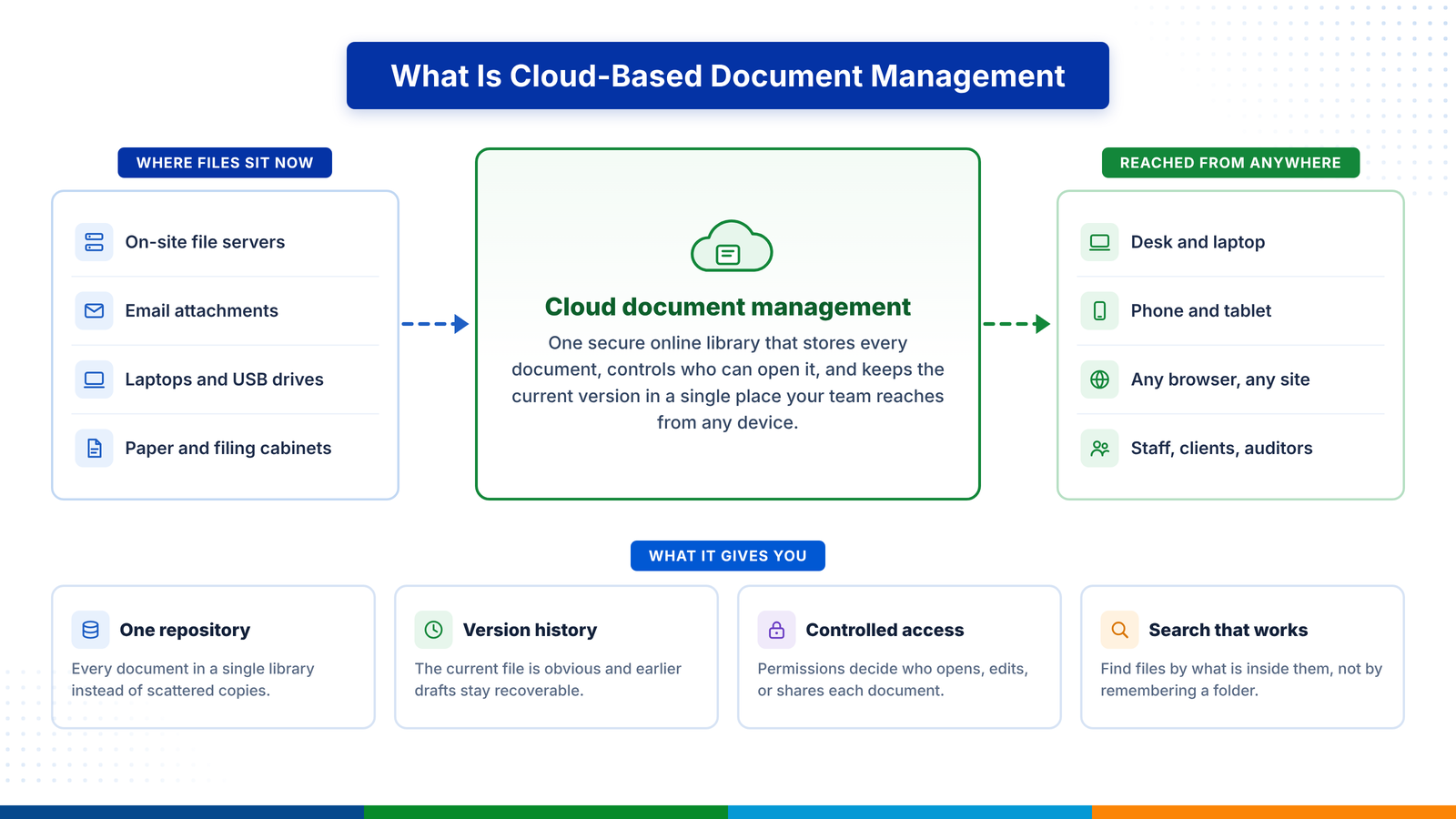
Cloud-based document management is software that stores, organizes, secures, and tracks business documents over the internet. It replaces isolated on-premises file servers with a centrally governed system covering the document lifecycle, from creation and collaboration through review, retention, archiving, and authorized disposal, supported by consistent organization-wide policies and oversight.
Employees access shared files through browsers or mobile apps, often without traditional VPN connections. Subscription-based pricing can replace some upfront hardware costs with predictable per-user expenses. IT directors, operations managers, and compliance officers at mid-market and enterprise organizations, particularly regulated businesses, commonly evaluate these solutions.
What Does Inefficient Document Management Really Cost?
Scattered files create more than storage expenses. They quietly drain employee time, delay decisions, and increase risk. The table below shows where these hidden costs appear.
| Cost Area | How It Shows Up |
|---|---|
| Employee lost to searching | Hours per employee each week spent hunting for files across drives and inboxes. |
| Version chaos and rework | Duplicated or conflicting copies cause corrections, overwritten work, and lost final drafts. |
| Manual approvals and follow-up | Emails and reminders consume time while staff chase signatures and decisions. |
| Server hardware and maintenance | Hardware purchases, patching, backup infrastructure, and ongoing IT support hours. |
| Compliance exposure | Failed audits, retention gaps, potential regulatory fines, and costly investigations. |
These costs compound as document volumes increase. In 2012 research, McKinsey estimated that knowledge workers spent roughly 20% of their day searching for and gathering information. That historical finding illustrates the scale of the problem, not a guaranteed saving from migration. The following features show how businesses can reclaim time and reduce recurring expenses.
How Cloud-Based Document Management Cuts Costs Fast?
Savings come from several connected improvements, not simply moving files online. Each capability below targets a different source of avoidable business expense.
Metadata Search That Ends Time Lost Hunting Files
Metadata tags organize documents by meaning instead of forcing employees through rigid folder trees. Full-text indexing makes content searchable by client, project, date, or document type in seconds. Because searching consumes paid labor across the workforce every day, faster retrieval is often the first noticeable saving.
Version Control That Prevents Rework and Lost Files
Automatic version history records changes, while check-in and check-out controls help teams coordinate edits when needed. Instead of files named final_v7_revised, staff can restore earlier versions in a click. Avoiding stale copies and missing final drafts cuts rework, turning hours previously wasted into productive time.
Real-Time Collaboration That Removes Duplicate Work
Several colleagues can co-author and comment on one document simultaneously, using browsers or mobile devices without traditional VPN access. Teams stop circulating email attachments that multiply into conflicting drafts. Whether employees work across offices or time zones, one shared artifact replaces competing copies and reduces repeated effort.
Workflow Automation That Eliminates Manual Admin
Automated workflows route invoices to accounting and contracts to the correct approvers. Connected e-signature tools can trigger signing requests, while retention rules schedule records for archiving or disposal. Reminders and status updates run consistently, reducing the administrative hours lost to chasing signatures, forwarding emails, and checking approvals.
Security Controls That Prevent Costly Breaches and Fines
| Control | What It Delivers |
|---|---|
| Role-based permissions | Only authorized people can view, edit, or share specific documents. |
| Encryption at rest and in transit | Helps protect stored files and information moving between systems. |
| Single sign-on | Centralizes identity-based access through an approved login system. |
| Audit trails | Records who accessed or edited content and when, subject to configuration. |
| Retention policies | Supports scheduled archiving, preservation, and authorized disposal. |
Granular permissions provide finer protection than broad folder sharing. For regulated organizations, audit trails and retention controls help demonstrate compliance and avoid costly failures. The stakes are significant: IBM reported a $4.44 million global average breach cost in 2025. Strong controls reduce exposure but cannot eliminate risk.
Integrations That Consolidate Tool Subscriptions
Integrations connect documents with Microsoft 365, Teams, CRM systems, e-signature services, and ERP or accounting software. Files stay inside everyday workflows instead of becoming another silo. Consolidating overlapping document tools can reduce recurring subscription expenses. Integration quality also drives adoption: employees rarely use systems that interrupt their work.
Top Cloud Document Management Platforms in 2026
The best cloud document management platform depends on your organization’s size, existing software, industry requirements, and need for specialized workflows, external collaboration, or secure client access.
| Category | Examples | Best For |
|---|---|---|
| All-in-one suites | Microsoft 365 with SharePoint; Google Workspace | Teams already working within these productivity ecosystems. |
| Enterprise content management | Box; DocuWare | Organizations needing complex workflows and secure external content collaboration. |
| Specialized platforms | NetDocuments for legal; SmartVault for accounting | Regulated niches requiring industry-specific processes and compliant client portals. |
How to Migrate Documents to Cloud Document Management?
A phased migration protects sensitive data, controls project costs, and prevents avoidable disruption during the transition.
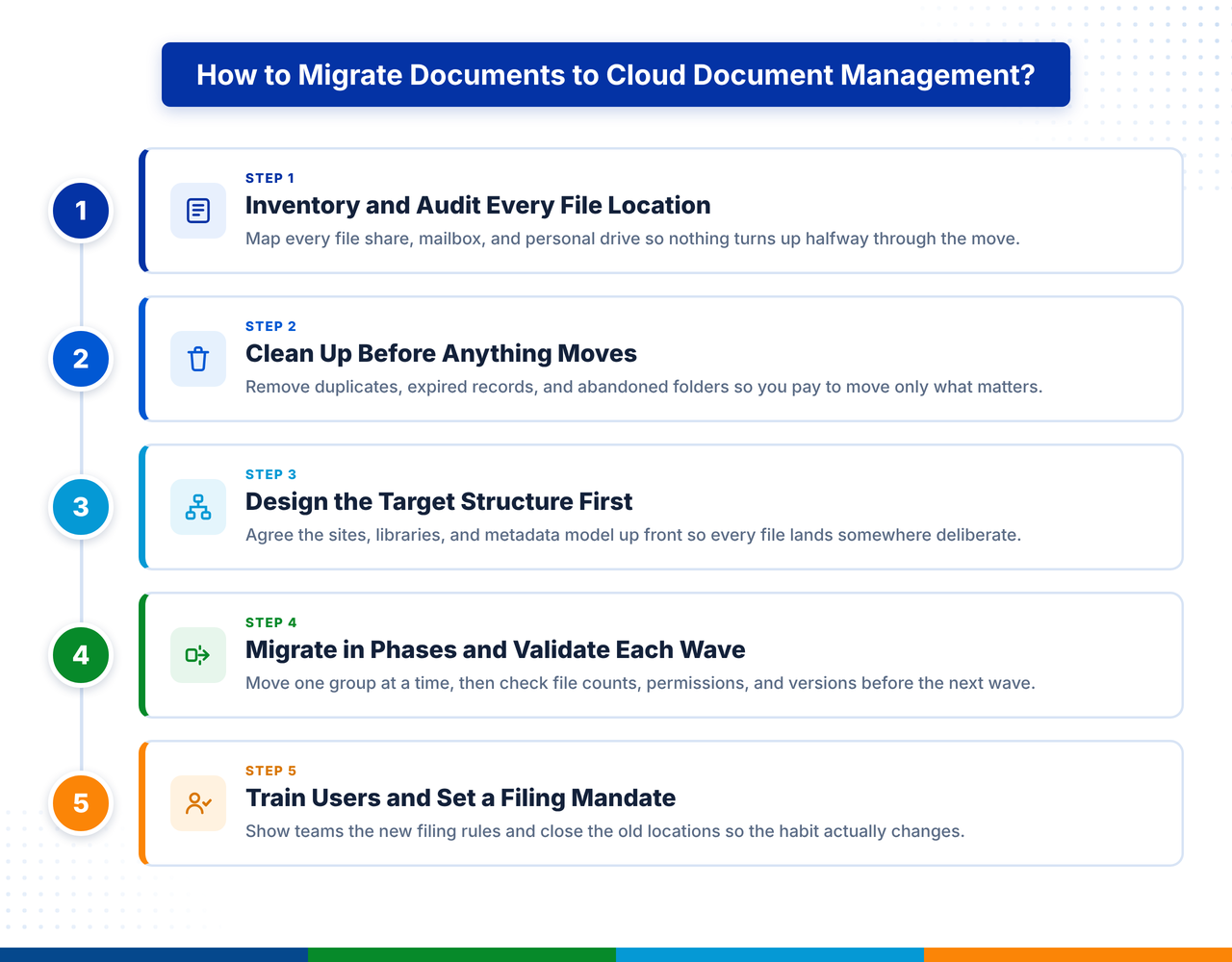
Step 1: Inventory and Audit Every File Location
List every file share, personal drive, and legacy repository across the business. Identify duplicate files, inactive records, and sensitive documents needing special handling. This audit establishes the real migration scope and reveals how much stored clutter is still used, helping control transfer, storage, and validation costs.
Step 2: Clean Up Before Anything Moves
Archive or delete outdated content according to approved retention rules, merge duplicates, and standardize inconsistent naming where useful. Moving obsolete files simply recreates the same problems in a new location. Cleaning first reduces migration volume, shortens transfer time, limits unnecessary storage charges, and simplifies employee training.
Step 3: Design the Target Structure First
Define document libraries, metadata columns, permission groups, and retention rules before moving content. These decisions shape search quality, access control, and governance for years. Retrofitting metadata into poorly structured libraries later is disruptive and expensive; designing around business processes from the beginning helps avoid that rework.
Step 4: Migrate in Phases and Validate Each Wave
Start with one department or a representative pilot, then check document completeness, metadata, links, and permissions after each wave. Address issues before beginning the next group. Phased migrations reduce operational downtime, make errors cheaper to correct, and build confidence before high-volume or business-critical repositories move.
Step 5: Train Users and Set a Filing Mandate
Provide role-based training, practical filing examples, and follow-up support during the first few weeks. Leadership should establish a clear mandate for where new documents belong. Early adoption determines whether savings appear: if employees keep using old drives and attachments, duplicated processes and costs will continue.
Migrating decades of content brings real risks, including broken links, missing permissions, and downtime. Many companies engage experienced cloud migration service providers to plan validation, safeguard records, and reduce disruption while moving essential business information.
How Does Reality Tech Help You With Cloud-Based Document Management?
Cloud-based document management lowers operating costs by retiring server infrastructure, reducing time lost to searching and version conflicts, and automating repetitive administration. With appropriately sized per-user subscriptions, businesses can make document expenses more predictable while improving control over their information.
Reality Tech is a New York City-based certified Microsoft Partner with more than 10 years of experience designing SharePoint and Microsoft 365 environments. Our document management solutions bring together information architecture, cloud migration, governance, and user training to support lasting adoption.
Schedule a free consultation to discuss your current document challenges and identify practical opportunities to reduce costs.
FAQs on Cloud Document Management
Document management stores, organizes, protects, and tracks files throughout their lifecycle. Workflow automation moves tasks and approvals between people or systems using predefined rules. Together, they reduce manual effort while keeping documents accessible and governed.
Cloud platforms can offer strong encryption, identity controls, audit logging, and managed updates. Security still depends on configuration, access policies, and governance. A properly managed cloud environment may outperform poorly maintained on-premises servers.
Pricing depends on the vendor, user count, storage, security features, and integrations. Many solutions charge per user monthly or annually. Calculate total costs, including migration, setup, training, and any extra workflow licenses.
A small, organized repository may migrate in days or weeks. Enterprise projects can take months, depending on file volume, permissions, links, and compliance needs. Inventory, pilot testing, and staged validation determine the timeline.
Have a question?
We’re here to help. Get in touch with us anytime, 24/7