



Microsoft is changing how Power Platform developer environments work.
The biggest change is the retirement of unmanaged developer environments, including environments automatically created through the free Power Apps Developer Plan.
For administrators, this is important because existing unmanaged developer environments will eventually be suspended and deleted unless action is taken.
The key deadline is:
December 15, 2026
Complete either conversion of required developer environments to Managed Environments or migration of their solutions before suspension begins on December 15, 2026.
Microsoft’s current deprecation schedule is:
| Date | Scheduled change |
|---|---|
| November 15, 2026 | New developer environments can only be created as managed developer environments. Existing managed developer environments remain unchanged. |
| December 15, 2026 | Suspension begins for existing unmanaged developer environments. Convert required environments to Managed Environments or move their solutions before this date. |
Managed developer environments are not affected by this change.
What Is Changing?
Until now, users with the Power Apps Developer Plan could receive a personal developer environment for building and testing Power Apps, Power Automate flows, Dataverse solutions, and other Power Platform components.
Many of these environments are unmanaged developer environments.
Microsoft is removing this model.
Starting November 15, 2026, the developer environment type will continue to exist, but only as a managed developer environment.
From November 15, 2026, each user can create only one managed developer environment. This creation limit does not change existing managed developer environments.
The direction is clear:
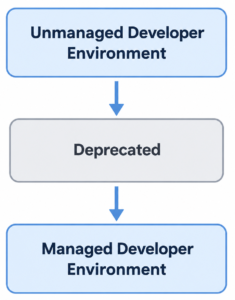
Figure 1: The shift to managed-only developer environments
Why Is Microsoft Making This Change?
The main reason is governance.
Unmanaged developer environments can sit outside some of the controls administrators rely on for enterprise Power Platform management.
Microsoft specifically points to governance capabilities such as Managed Environments policies, usage visibility, and sharing controls as reasons for moving developers toward managed environments.
A managed model gives administrators better visibility over where makers build and provides a more consistent governance framework.
This becomes increasingly important as Power Platform environments contain more than just apps.
They can also contain Power Automate flows, Dataverse data, Copilot Studio agents, Power Pages developer sites, connections, and APIs.
So, developer environments are becoming part of the broader enterprise application estate.
Who Is Affected?
The change primarily affects organizations that currently have Developer environments where Managed = No.
It also affects users relying on the Power Apps Developer Plan to provision an unmanaged developer environment automatically.
Microsoft states that if users do not convert an unmanaged developer environment or move its content before December 15, 2026, they can lose access to the apps, flows, agents, Power Pages sites, and data inside it when suspension begins.
This retirement applies to unmanaged developer environments. It does not apply to existing managed developer environments, environments created through environment routing, production environments, sandbox environments, trial environments, or default environments.
What Administrators Should Do Now
1. Identify Unmanaged Developer Environments
The first step is inventory.
In the Power Platform admin center, navigate to Manage → Environments and filter the list to show environments where Type = Developer and Managed = No.
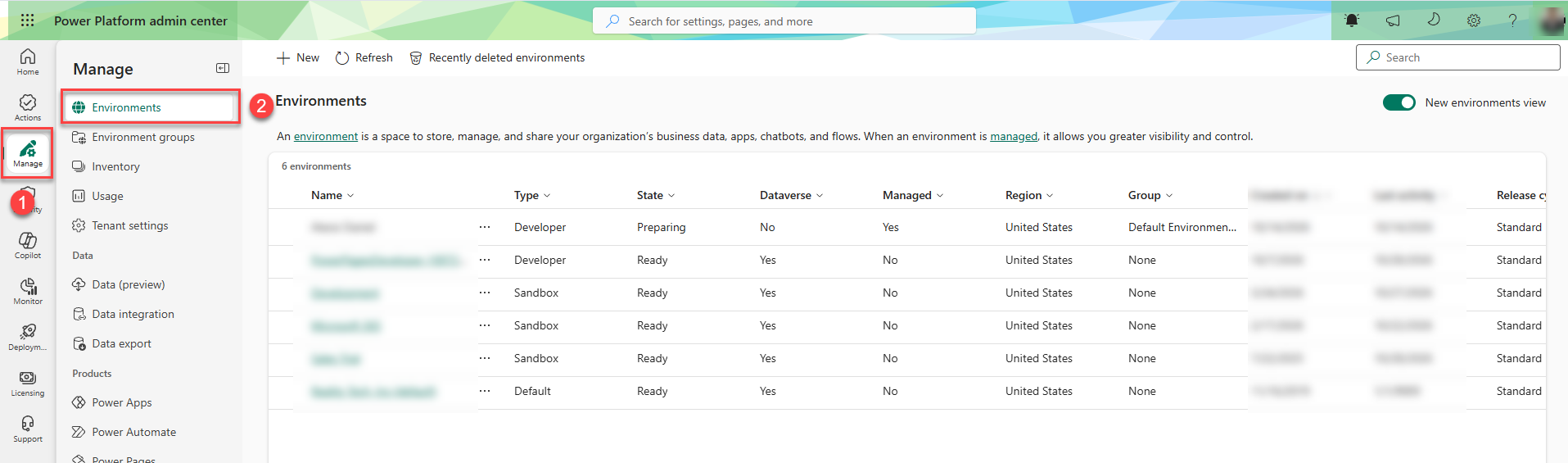
Microsoft also recommends using the Last activity information to determine which environments are still actively being used.
Admins should classify each environment as Still Required, Needs Migration, or Can Be Retired.
Do not wait until December to discover which environments contain active development work.
2. Decide Whether to Convert or Migrate
For every unmanaged developer environment that is still required, administrators have two main options.
Option 1 – Convert It to a Managed Environment
If the users have the appropriate licensing, enable Managed Environments on the existing developer environment.
The environment remains a developer environment and keeps its apps, flows, agents, and data.
Microsoft identifies this as the recommended migration path where licensing allows it.
Option 2 – Move the Solutions
If converting the environment is not appropriate, export the solutions and move them into another supported environment, such as a sandbox.
A simple model is:
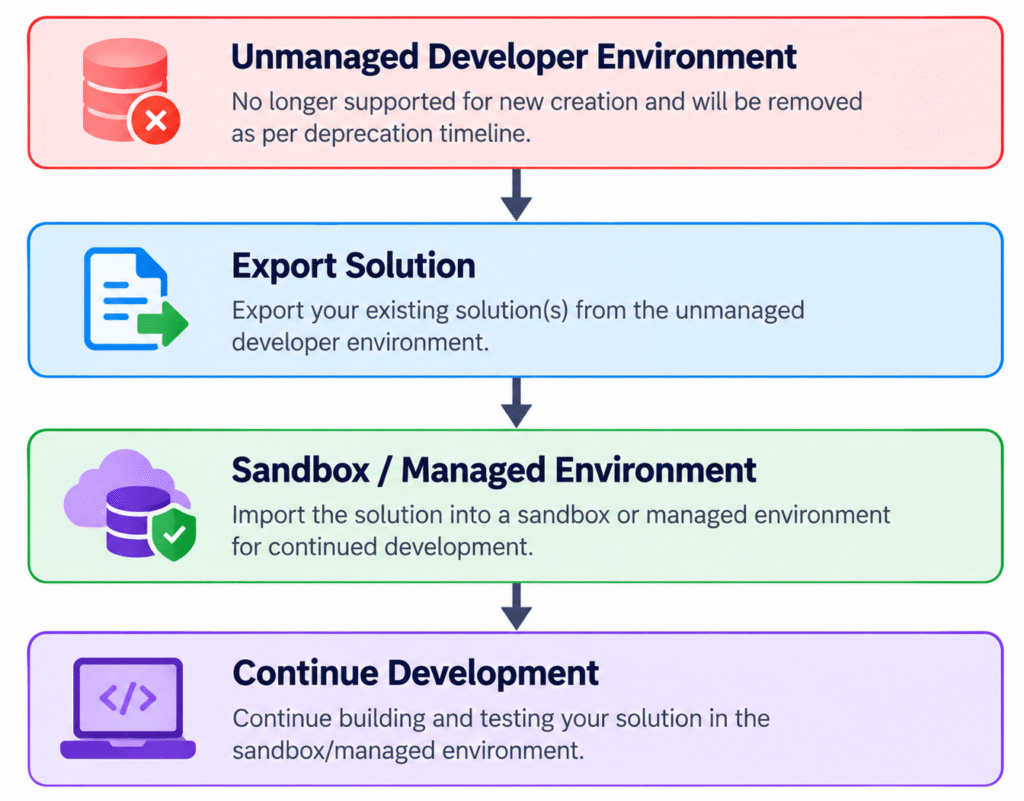
Planning the conversion or migration path is especially important for teams already using solutions and application lifecycle management (ALM).
3. Review Licensing Before Enabling Managed Environments
This is one of the most important details.
The Power Apps Developer Plan alone does not provide Managed Environments use rights when users run their assets.
Microsoft states that Managed Environments are included with qualifying standalone licenses such as Power Apps, Power Automate, Copilot Studio, Power Pages, and Dynamics 365.
Before converting large numbers of developer environments, administrators should therefore review:
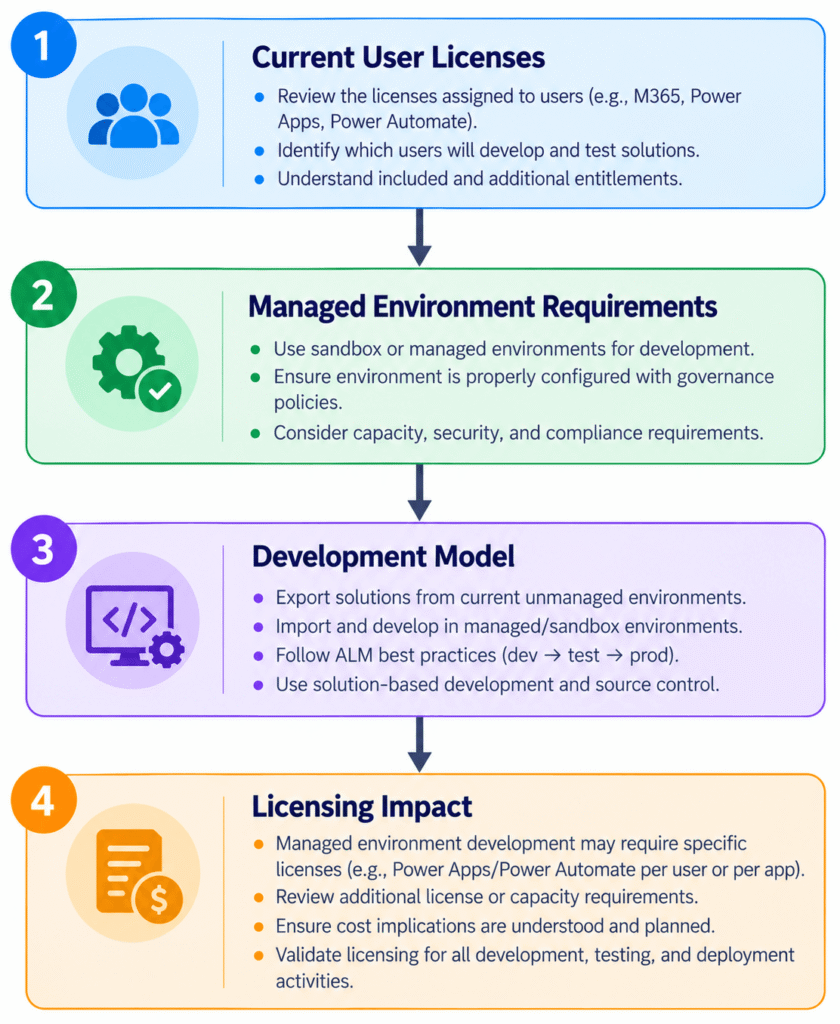
The technical conversion may be simple. The licensing impact still needs planning.
4. Consider Environment Routing
For organizations with many makers, environment routing may become the preferred approach.
Environment routing automatically directs makers to personal managed developer environments instead of letting development happen in the default environment.
Microsoft confirms that environments created through environment routing are managed and are not affected by the unmanaged-developer-environment deprecation.
The architecture becomes:
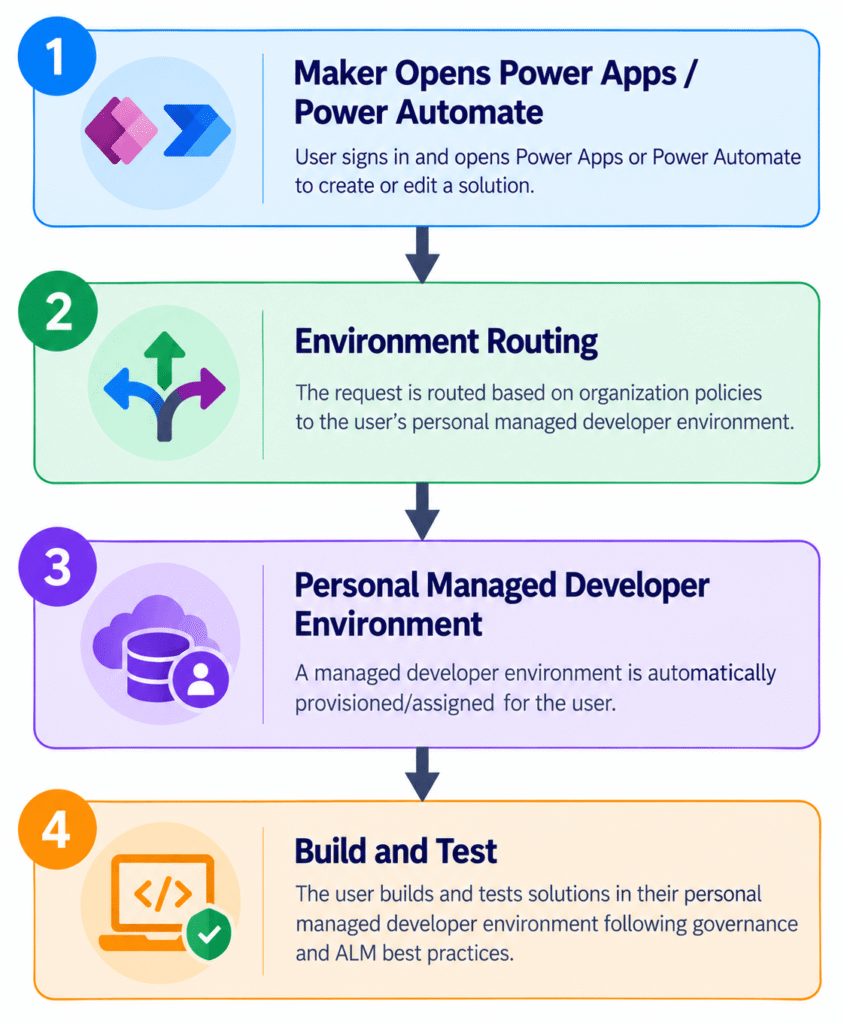
For larger organizations, Microsoft also supports multi-rule environment routing, allowing administrators to route different groups of makers into different governed environment groups.
This provides more control over where development happens.
5. Review Developer Environment Creation Settings
Administrators should also review the tenant settings controlling who is allowed to create developer environments.
Starting November 15, 2026, users cannot create unmanaged developer environments regardless of this setting. The setting instead controls who can create managed developer environments.
This is a good opportunity to define a clearer Power Platform development model.
For example:
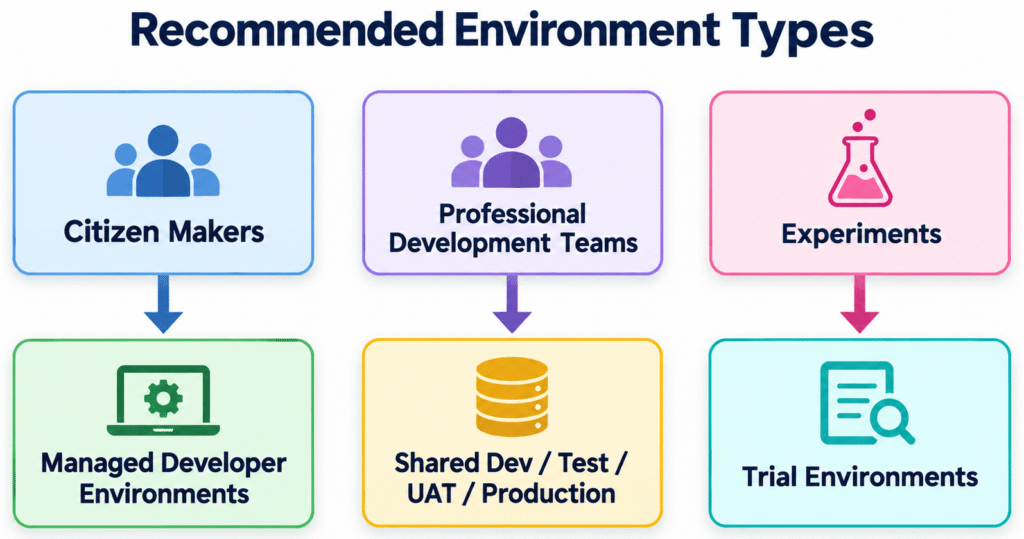
The exact model will depend on the organization, but unmanaged personal environments should no longer be assumed as the default development strategy.
What Happens If Administrators Do Nothing?
The timeline is important.
If an unmanaged developer environment remains unchanged:
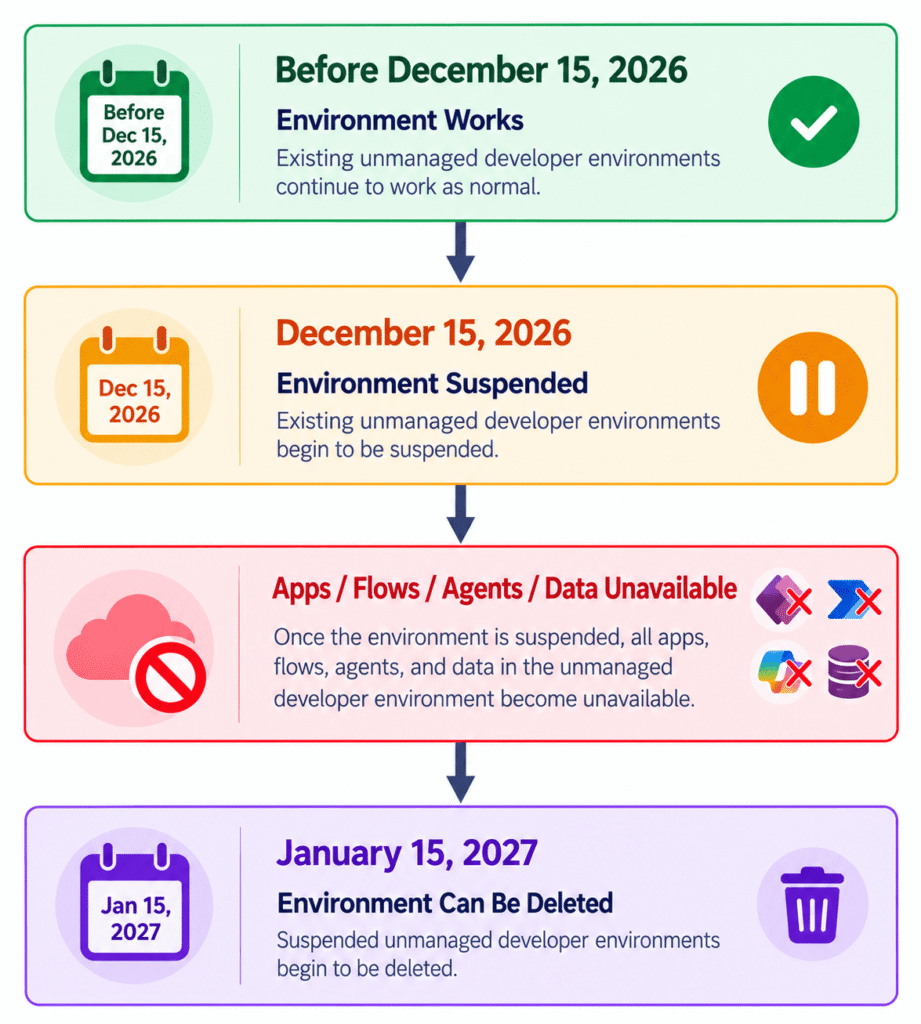
Microsoft explicitly recommends exporting solutions before suspension if the organization wants to preserve the work.
This should therefore be treated as a migration and governance task, not merely a product notification.
Recommended Administrator Checklist
Before December 15, 2026, administrators should make sure they have:
- Identified all unmanaged developer environments.
- Determined which environments are still actively used.
- Exported important solutions and backed up required development assets.
- Converted eligible environments to Managed Environments.
- Moved remaining solutions into sandbox or other approved environments.
- Reviewed Managed Environments licensing.
- Enabled environment routing where appropriate.
- Reviewed who is allowed to create developer environments.
- Communicated the change to makers and development teams.
The most important action is simple:
Do not leave active development assets inside unmanaged developer environments after December 15, 2026.
Final Thoughts
Microsoft is not removing developer environments.
It is removing the unmanaged model.
After November 15, 2026, developer environments move toward a managed-only future, and existing unmanaged developer environments start being suspended on December 15, 2026.
For administrators, the next steps are straightforward:
Inventory → Assess → Convert or Migrate → Configure Routing → Govern
Organizations that complete this work early can avoid disruption while also using the change as an opportunity to strengthen their Power Platform environment strategy.
The key deadline is December 15, 2026.
By that date, every active unmanaged developer environment should have a clear destination.
Have a question?
We’re here to help. Get in touch with us anytime, 24/7