



Power BI Pro is a per-user license for publishing, sharing, and collaborating on reports. Premium Per User (PPU) adds advanced features for individually licensed users, while Microsoft Fabric capacity supports enterprise distribution, including free viewers for eligible Power BI content on F64 and larger capacities. The most economical option depends on your creators, viewers, model sizes, and performance requirements. Microsoft increased per-user prices in April 2025 and is transitioning legacy Premium P SKUs to Fabric F SKUs. Below, compare features, sharing rights, and monthly cost scenarios before choosing.
Power BI Pro vs Premium Comparison
The key Power BI Pro vs Premium difference is not simply the feature list: it is who needs a paid license to consume reports. Compare the three practical options below, then use the detailed sections to evaluate model limits, sharing rules, advanced capabilities, and total monthly cost.
| Feature | Power BI Pro | Premium Per User (PPU) | Premium Capacity / Fabric |
| List price/month | $14 per user | $24 per user | Varies by F SKU, region, and commitment |
| Licensing model | Per user | Per user | Capacity plus creator licenses |
| Semantic model size | 1 GB | Up to 100 GB | SKU-dependent; up to 400 GB on eligible SKUs |
| Scheduled refresh | 8/day | 48/day | Up to 48/day on eligible capacity |
| Viewer licensing | Pro or PPU required | PPU required | Free viewers on F64+ with eligible content |
| Advanced features | Core collaboration | Advanced model management and reporting | Dedicated compute and Fabric workloads |
| Best for | Small licensed teams | Advanced BI teams | Large viewer populations |
Power BI Pro vs Premium Pricing
| License | Pricing basis | List price |
| Power BI Pro | Per user/month | $14 |
| Premium Per User | Per user/month | $24 |
| Fabric capacity | Per capacity/month | Varies by SKU, region, and billing plan |
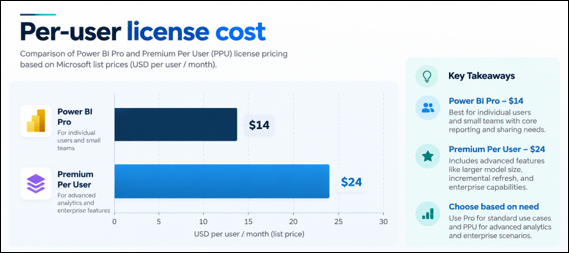
Figure 1. Per-user prices shown for comparison; capacity is priced separately.
On April 1, 2025, Microsoft raised Power BI Pro from $9.99 to $14 and PPU from $20 to $24 per user per month. Older comparisons may still show outdated prices. Fabric pricing depends on capacity units, Azure region, and pay-as-you-go versus reservation. Compare the full monthly cost of every licensed creator and viewer against the selected capacity-not one license against one capacity.
Data Model Size and Refresh Limits
| Limit | Power BI Pro | Premium Per User | Fabric Capacity |
| Semantic model size | 1 GB | Up to 100 GB | SKU-dependent; up to 400 GB |
| Scheduled refresh | 8/day | 48/day | Up to 48/day |
| Compute | Shared | PPU resources | Dedicated capacity |
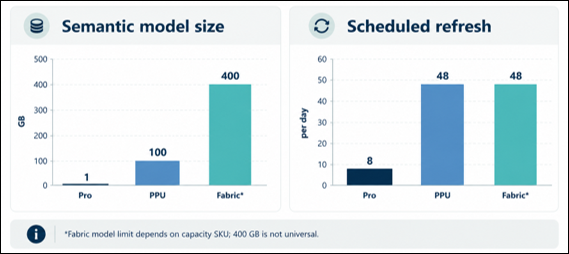
Figure 2. Model size and scheduled refresh limits by licensing approach.
A 1 GB compressed model often suits departmental reporting. PPU can support larger shared semantic models up to 100 GB and more frequent refreshes. Dedicated Fabric compute gives organizations control over capacity sizing and workloads, although performance still depends on utilization. Before upgrading, try a star schema, query folding, removing unnecessary high-cardinality columns, and reducing unneeded history.
Sharing Rules and Viewer Licensing
| Rule | Power BI Pro | Premium Per User | Fabric Capacity |
| Who can publish | Pro or PPU | PPU | Pro or PPU |
| Who can view shared content | Pro or PPU | PPU | Free viewers on F64+ for eligible content |
| Workspace access | Shared capacity | PPU-only workspace | Capacity-backed workspace |
Viewer rights frequently determine the total bill. A Pro-only user cannot access content hosted in a PPU workspace, even if a colleague published it. Keep PPU workspaces separate from company-wide Pro distribution to prevent access problems. Hundreds of viewers may justify modeling F64 capacity, but the break-even depends on actual capacity price, number of creators, and workload needs-not a fixed 500-user threshold.
Advanced Features in Premium Per User and Fabric
| Capability | Power BI Pro | Premium Per User | Fabric Capacity |
| XMLA read/write | Not on shared Pro capacity | Available | Available on supported SKUs |
| Deployment pipelines | Licensing/capacity dependent | Available | Available on supported capacity |
| Paginated reports | Creation may be available; sharing restricted | Available | Available on supported capacity |
| Advanced AI and dataflows | Limited / workload dependent | Selected advanced features | Fabric workloads; Copilot subject to eligibility |
External semantic-model tools, governed release processes, paginated reports, and complex data workflows can make premium capabilities valuable. PPU offers a practical route for a defined advanced BI team. Fabric becomes more attractive when multiple workloads require dedicated compute. Feature availability varies by SKU and tenant settings; check current Microsoft documentation before treating any capability as universally included.
The Shift from Premium Capacity to Microsoft Fabric
| SKU family | What it is | Status in 2026 |
| P SKUs | Legacy dedicated Premium capacity | Transition to Fabric at renewal; confirm agreement |
| F SKUs | Fabric capacity for Power BI and other data workloads | Current capacity family; free viewing at F64+ |
New licensing comparisons should focus on Pro, PPU, and Fabric F capacity rather than assuming legacy P capacity remains the default purchase. Existing P SKU customers should review their renewal and migration options. Fabric adds a wider data platform, so the choice is no longer only about Power BI report distribution.
Power Platform and Microsoft 365 Integration
| Integration point | What it adds |
| Microsoft Teams | Share and access reports in collaboration workflows |
| Excel | Analyze connected Power BI data |
| SharePoint | Embed reports on SharePoint pages |
| Dynamics 365 | Surface analytics within business applications |
| Power Apps and Power Automate | Use analytics in applications and automation |
Excel, Teams, SharePoint, and Dynamics 365 integration is broadly possible across licensing options, subject to sharing permissions. Choose your tier primarily for audience size, semantic-model limits, and compute economics. Power BI also complements Power Apps and Power Automate, connecting insights to business workflows. Explore Reality Tech’s Power Platform Solutions
When Should You Choose Power BI Pro?
Power BI Pro is usually the most straightforward option when everyone can be licensed, and reporting requirements remain manageable.

- Your reporting audience is a small or mid-sized group, typically around 150–200 active viewers or fewer, without complex capacity requirements.
- Your compressed semantic models remain below 1 GB, and eight scheduled refreshes per day support business reporting needs.
- Every creator and report consumer can hold an appropriate paid Power BI license without making distribution unnecessarily expensive.
- Your team does not currently require premium model management, specialized deployment processes, or advanced capacity-dependent reporting capabilities.
- Check existing Microsoft 365 E5 subscriptions first because eligible E5 plans include Power BI Pro, avoiding duplicate purchases.
When Should You Choose Power BI Premium Per User?
Choose PPU when advanced analysts need premium capabilities but the intended audience is small enough for per-user licensing.
- Your semantic models have exceeded the 1 GB Pro limit and require the larger model allowance available through PPU.
- Your BI specialists need XMLA endpoints, external modeling tools, deployment pipelines, or more advanced paginated reporting workflows.
- A defined group of developers and analysts wants premium capabilities without purchasing and administering dedicated Fabric capacity.
- Your reporting roadmap includes advanced data preparation or AI-related functionality, with feature eligibility checked against current Microsoft requirements.
- Every person accessing a PPU workspace can receive PPU licensing; Pro-only users cannot open reports shared from those workspaces.
When Should You Choose Premium Capacity or Fabric?
Fabric capacity deserves serious consideration when your organization has many report viewers, demanding workloads, or broader data platform needs.
| Team size | Pro for everyone | PPU for everyone | F64 + Pro creators |
| 50 users; 3 creators | 50 × $14 = $700 | 50 × $24 = $1,200 | $5,003 + 3 × $14 = $5,045* |
| 200 viewers; 3 creators | 203 × $14 = $2,842 | 203 × $24 = $4,872 | $5,003 + 3 × $14 = $5,045* |
| 1,000 viewers; 20 creators | 1,020 × $14 = $14,280 | 1,020 × $24 = $24,480 | $5,003 + 20 × $14 = $5,283* |
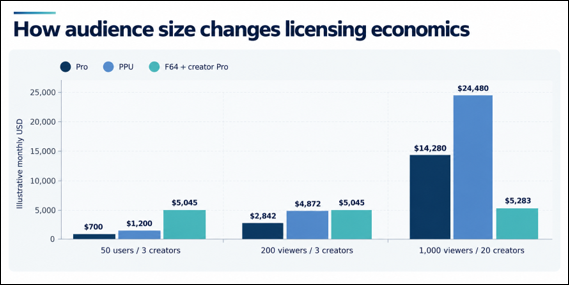
Figure 3. Illustrative license-cost comparison based on the example F64 price in this article; verify regional capacity rates.
*Illustrative list-price scenario using the existing blog’s $5,003 F64 assumption; capacity rate, reservation eligibility, and region require verification. Viewer totals exclude creators unless stated otherwise.
- Hundreds or thousands of occasional report viewers can make individual licenses more expensive than a suitably sized capacity.
- F64 and higher capacities permit free-license viewers for eligible Power BI content, while report creators generally still need Pro or PPU.
- Dedicated compute can improve predictability for critical workloads when capacity sizing, governance, and utilization are managed appropriately.
- A Fabric capacity can also support data engineering, data integration, and real-time analytics beyond traditional Power BI reporting.
- When your combined per-user cost approaches an appropriate capacity quote, model both options using real usage and workload requirements.
Reality Tech’s Power BI consulting solution can model these options against actual consumption before you commit.
How Does Reality Tech Help You Choose and Implement the Right Power BI Solution?
Power BI Pro works well for licensed collaboration, while Premium Per User adds advanced BI capabilities for a defined group. Fabric capacity changes the economics when report viewers greatly outnumber creators, and the transition from legacy Premium capacity makes Pro, PPU, and Fabric the key options to evaluate in 2026. Reality Tech, a New York City-based Microsoft Partner, helps organizations assess license mixes, design reports, plan deployments, implement governance, and train users as part of a broader Power Platform practice. Explore our Power BI consulting services and schedule a free consultation to identify a cost-effective approach for your business
FAQs on Comparison of Power BI Pro vs Premium
There is no universal threshold. Compare the total cost of licensed viewers and creators with a suitable F64-or-higher capacity quote. Viewer volume, workload sizing, reservation terms, and existing Microsoft 365 licenses all affect the result.
Yes, an organization can own both license types, but Pro-only users cannot access content in PPU workspaces. Separate workspaces by audience and sharing requirements, and ensure everyone who needs PPU-hosted content has a PPU license.
Count creators and viewers separately, identify existing E5 entitlements, and estimate monthly Pro or PPU licensing. Compare those totals with region-specific Fabric capacity pricing, including reservation assumptions, performance needs, and other Fabric workloads.
Yes, eligible Microsoft 365 E5 subscriptions include Power BI Pro. Check your organization’s specific agreement and assigned service plans before purchasing additional Pro licenses, since existing entitlements can materially reduce the cost of per-user reporting.
Yes. You can assign PPU licenses to users or move eligible workspaces to Fabric capacity as requirements grow. Plan migrations carefully because PPU workspace access rules and F64 free-viewer eligibility affect report sharing.
Publishing verification: confirm current Microsoft prices, Fabric SKU-specific limits, feature eligibility, and reservation costs before publication. The F64 figure above is illustrative, not a confirmed current quote.
Have a question?
We’re here to help. Get in touch with us anytime, 24/7