



Organizations invest heavily in Microsoft 365, yet many still struggle with one common challenge: employees cannot find the information when they need it.
The issue is rarely caused by SharePoint Search or Microsoft 365 Copilot. Instead, it usually comes down to one overlooked factor-poor metadata.
Many organizations still organize documents using deeply nested folders and inconsistent file names. While this approach may have worked in traditional file servers, it creates significant challenges for modern search experiences, AI-powered assistants, document governance, and knowledge management.
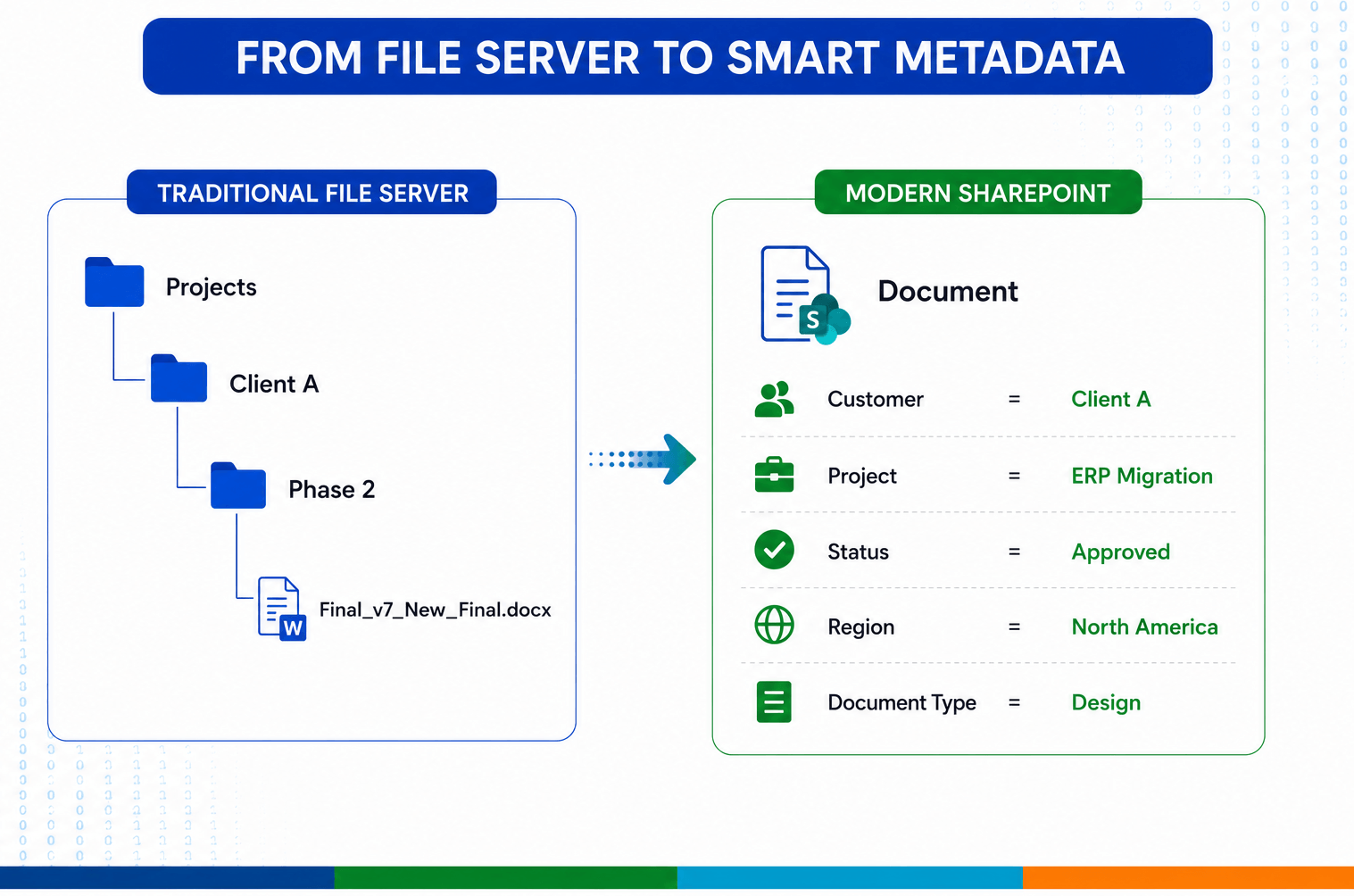
Metadata turns folder chaos into structured, searchable, and Copilot-ready content.
As Microsoft 365 Copilot becomes part of everyday work, metadata is no longer just a SharePoint feature-it has become a critical component of an organization’s AI readiness strategy.
In this article, we’ll explore why metadata matters more than ever, common implementation mistakes, practical strategies, and how a well-designed metadata model improves both SharePoint Search and Microsoft 365 Copilot responses.
Why Metadata Matters More Than Ever?
Metadata is simply information about your information.
Instead of relying only on document names and folder locations, metadata provides structured business context.
Why Metadata Improves Microsoft 365 Search?
SharePoint Search indexes much more than document contents.
It also indexes metadata such as:
- Managed Metadata
- Choice Columns
- Site Columns
- Content Types
- Authors
- Created Date
- Modified Date
- Sensitivity Labels
- File Type
- Custom Business Properties
When metadata is consistent, users can search naturally:
- Approved HR Policies
- Finance SOPs for Europe
- Sales presentations for Healthcare customers
- Project design documents created this year
Instead of searching by filename, users search by business meaning.
This dramatically reduces the time employees spend looking for information.
Metadata Is Even More Important for Microsoft 365 Copilot
Microsoft 365 Copilot doesn’t simply “read documents.”
It grounds its responses using Microsoft Graph, SharePoint Search, permissions, semantic relationships, and organizational knowledge.
Good metadata gives Copilot additional context to identify:
- which documents are authoritative
- which versions are current
- which department owns the content
- which projects the information belongs to
- whether the information is confidential
- how different documents relate to one another
Imagine asking Copilot:
“Summarize all approved cybersecurity policies for our finance department.”
If every policy document includes metadata like:
- Department = Finance
- Document Type = Policy
- Status = Approved
Copilot can identify the correct documents with much greater precision.
Without metadata, it may include outdated drafts, archived files, or unrelated documents that happen to contain similar keywords.
AI is only as good as the quality of the data it can understand.
The Hidden Cost of Folder-Only Thinking
Many organizations migrating from file shares simply recreate the same folder hierarchy in SharePoint.
This is one of the most common modernization mistakes.
Typical folder structures become:
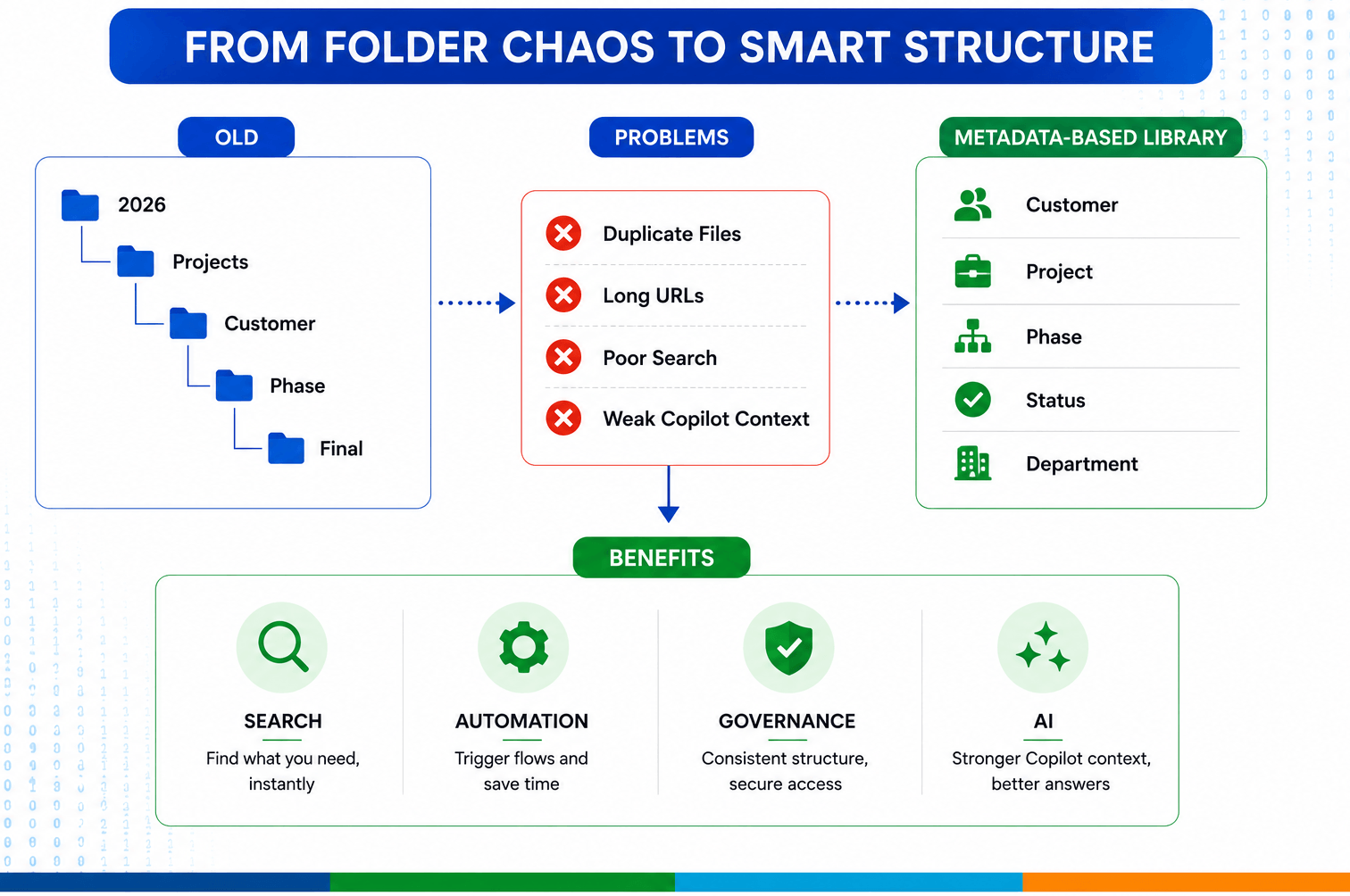
Modern SharePoint uses metadata to make content easier to find, manage, and trust.
Problems quickly emerge:
- Duplicate documents
- Difficult search experiences
- Long URLs
- Broken automation
- Difficult permissions
- Poor reporting
- Weak Copilot context
Folders describe where a file is stored.
Metadata describes what the file represents.
Modern SharePoint solutions prioritize metadata over excessive folder nesting.
Designing a Practical Metadata Strategy
A successful metadata strategy starts with understanding the business-not the technology.
Before creating columns, ask:
- How do users search for information?
- What business properties identify a document?
- Which information changes frequently?
- Which information should remain standardized?
- What reports will management need?
The answers usually become metadata columns.
Use Managed Metadata Wherever Possible
One common mistake is creating dozens of Choice Columns that eventually become inconsistent across sites.
Instead, organizations should use the SharePoint Term Store for reusable business taxonomies.
Benefits include:
- Central management
- Consistent terminology
- Easier governance
- Better reporting
- Reduced spelling variations
For example:
Instead of allowing users to type:
- Healthcare
- Health Care
- HealthCare
- Medical
A managed term ensures everyone selects:
Healthcare
Small consistency improvements create significant search improvements over time.
Metadata Supports Governance Too
Metadata isn’t only for search.
It enables several Microsoft Purview and SharePoint governance capabilities, including:
- Retention labels
- Information lifecycle management
- Records management
- Document classification
- Compliance reporting
- Content lifecycle automation
For example:
| Documents where:
Document Type = Contract Status = Executed can automatically receive a seven-year retention policy. Without metadata, these business rules become difficult to automate reliably. |
Automating Metadata with Power Platform
Users often worry that metadata entry creates additional work.
In practice, much of it can be automated.
Power Automate can:
- Populate project metadata from a project register.
- Assign departments based on library location.
- Update document status during approval workflows.
- Apply classifications automatically.
- Notify users when required metadata is missing.
Power Apps can provide business-friendly forms that simplify metadata capture and reduce user errors.
Automation improves both data quality and user adoption.
- Common Metadata Mistakes
After reviewing numerous Microsoft 365 implementations, several patterns appear repeatedly.
- Using folders instead of metadata
Folders remain useful in moderation, but they should not replace business classification.
- Creating too many required columns
Excessive mandatory fields frustrate users and reduce adoption.
Only collect metadata that provides real business value.
- Allowing free-text everywhere
Free-text columns quickly become inconsistent.
Use managed terms or controlled choice values whenever possible.
- Ignoring governance
Metadata should support compliance, reporting, retention, and AI-not just document organization.
- Not planning for Copilot
Organizations preparing for AI should review whether their content has sufficient structure and business context for reliable grounding.
Best Practices for AI-Ready SharePoint Libraries
Organizations preparing for Microsoft 365 Copilot should consider the following checklist:
- Design metadata around business processes, not folder structures.
- Standardize terminology using Managed Metadata.
- Keep metadata simple and meaningful.
- Create reusable Site Columns where appropriate.
- Use Content Types for different document categories.
- Automate metadata population whenever possible.
- Periodically review unused or duplicate metadata.
- Align metadata with governance, retention, and compliance requirements.
- Ensure document permissions remain accurate, as Copilot respects existing access controls.
- Treat metadata as a long-term information architecture investment rather than a one-time project task.
Final Thoughts
The success of Microsoft 365 Copilot doesn’t begin with AI-it begins with well-structured information.
Organizations that invest in a thoughtful metadata strategy create benefits far beyond search. They improve governance, simplify automation, strengthen compliance, reduce duplicate content, and provide AI with the business context it needs to generate more accurate and trustworthy responses.
Metadata is no longer just an administrative detail. It is a foundational element of a modern Microsoft 365 information architecture and one of the most impactful investments an organization can make to improve knowledge discovery and prepare for the future of AI-powered work.
As organizations continue modernizing their digital workplaces, those that prioritize structured, consistent, and business-focused metadata today will be better positioned to unlock the full value of SharePoint Search, Microsoft 365 Copilot, Power Platform, and the broader Microsoft ecosystem tomorrow.
Have a question?
We’re here to help. Get in touch with us anytime, 24/7