



AI agent governance in Microsoft Purview is the practice of using Microsoft’s data security and compliance platform to control how AI agents access, process, and share enterprise data. The gap is already measurable: in IBM’s Cost of a Data Breach Report 2026, 92% of organizations that experienced an AI-related breach lacked adequate AI access controls. Reality Tech, a Microsoft Partner, helps enterprises configure these controls so they can adopt AI confidently and stay compliant.
This blog covers how Purview prevents data leakage, manages AI agents at scale, and gives your organization a governance framework built for the agentic AI era. If your enterprise is deploying Microsoft 365 Copilot or building custom AI agents, this is where you start.
What Is AI Agent Governance in Microsoft Purview?
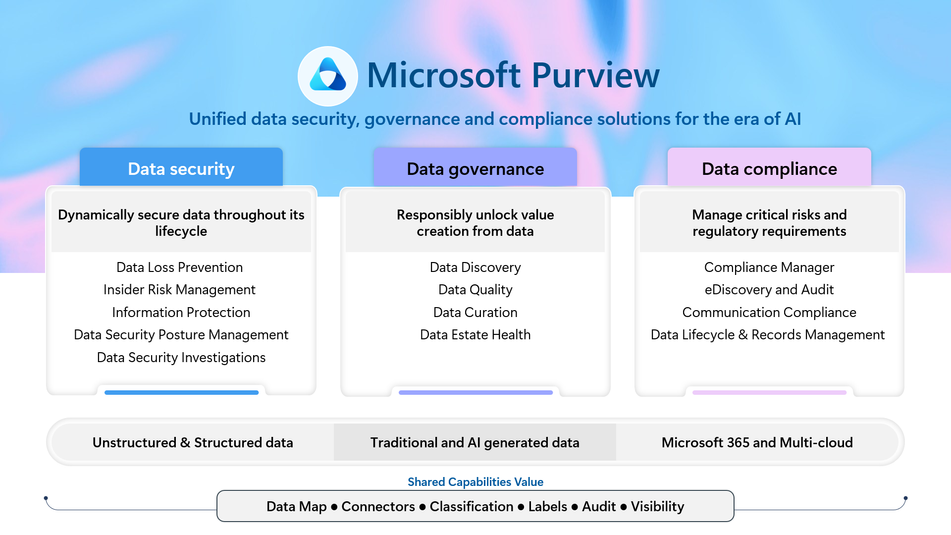
AI agent governance is the set of policies, tools, and processes that control how AI agents access, use, and share enterprise data. In Microsoft Purview, this means enterprises can see every AI interaction, enforce data protection rules, and audit agent behavior from a single platform.
This matters because AI agents operate at machine speed. Without governance, they can surface sensitive data, overshare files, and create compliance gaps faster than any human could. With governance in place, enterprises gain the visibility and control to scale AI with confidence.
Microsoft was recognized as a Leader in the 2025-2026 IDC MarketScape for Worldwide Unified AI Governance Platforms. This recognition highlights how Purview, together with Agent 365 and Microsoft Entra, gives enterprises a control plane purpose-built for the agentic AI era.
Here is why this matters right now. According to Deloitte’s State of AI in the Enterprise 2026 report, 74% of organizations plan to implement agentic AI within two years, but only 21% have mature governance models in place. That gap between adoption speed and governance readiness is where enterprise risk lives.
How Does Purview Protect Your Enterprise Data from Leaking?
Purview protects enterprise data from AI-driven leakage through real-time DLP enforcement, sensitivity labels, and centralized risk visibility. These controls work together to ensure that AI agents and Copilot only surface data that users are authorized to see.
When an employee asks Microsoft Copilot a question, the AI searches across SharePoint, Teams, OneDrive, and email to build a response. If permissions are messy or files are mislabeled, Copilot can surface confidential information to people who should not see it. Purview addresses this through several layers of protection.
Data Loss Prevention (DLP) for AI prompts and responses
Purview DLP can now block sensitive information like Social Security numbers, credit card data, and custom sensitive data types from being processed by Copilot or used in web grounding. This applies in real time. If someone types a prompt that contains restricted data, Purview blocks the response before it reaches the user.
Sensitivity labels that travel with files
When a document has a sensitivity label like “Confidential” or “Restricted,” AI agents respect those labels. If a file is labeled with encryption, users need the correct usage rights for Copilot to return that data. Your labeling strategy becomes your first line of AI defense.
Data Security Posture Management (DSPM) for AI
DSPM acts as your AI security dashboard. It shows which AI apps are active in your tenant, how sensitive data flows through prompts and responses, and where your oversharing risks live. It also suggests protection policies you can enable with a few clicks.
According to research from CDW, only 51% of organizations have established a data governance framework. That means nearly half of enterprises deploying AI tools are doing so without baseline protections. Purview gives you that protection from day one.
Reality Tech, as a Microsoft Partner with deep expertise in Microsoft Purview compliance, helps businesses configure DLP, labeling, and DSPM so that security and compliance policies match how your teams actually work.
How Does Purview Help Manage AI Apps and Agents?
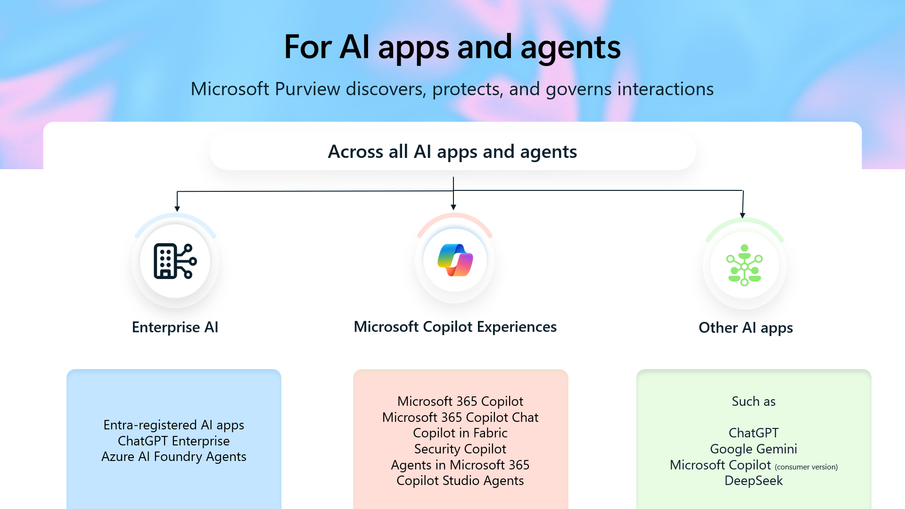
Purview helps manage AI apps and agents by extending identity-based governance, DLP enforcement, and audit logging to every agent in your Microsoft environment. Agents are treated like identities, not just applications.
Managing AI agents is different from managing traditional apps. Agents can act on behalf of users, operate continuously, invoke other apps, and access data at scale. They need governance controls as rigorous as those applied to your employees.
Microsoft responded to this reality with Agent 365, a unified control plane that became generally available in May 2026. Agent 365 works with Purview, Microsoft Entra, and Microsoft Defender to give IT teams centralized visibility over every AI agent deployed across the organization. This applies to agents built in Copilot Studio, Microsoft Foundry, open-source frameworks, and third-party platforms.
Here is what Purview enables for agent management.
Agent Discovery and Visibility
DSPM for AI now includes AI Observability, which lets admins see all agents operating within their Microsoft environment. You can assign risk levels to agents and receive guided recommendations for reducing those risks.
DLP and Information Protection for Agents
Agents inherit the same protections as human users. An agent cannot access a file with a “Confidential” sensitivity label any more than an unauthorized employee can. Agents also cannot send Teams messages containing sensitive data types blocked by your DLP policies.
Communication Compliance, Audit, and eDiscovery for AI Interactions
Every prompt, response, and file reference is logged in the unified audit log. eDiscovery can search and export AI interactions alongside email and Teams messages. Records management policies can retain or delete AI-generated content based on your organizational rules.
Imagine your organization deploying ten custom agents across HR, finance, and operations. Without Purview, you have no idea what data those agents are accessing. With Purview, you see exactly which agents are active, what risk level they carry, what sensitive data they touched, and whether any policy violations occurred.
How Can Enterprises Build Resilient AI Security and Governance Infrastructure in Purview?
Enterprises build resilient AI governance in Purview by following a layered approach: assess your data, label sensitive content, turn on DSPM, enforce DLP for AI, and enable continuous monitoring. Reality Tech helps clients implement this framework across Microsoft 365 environments.
Here is the step-by-step framework.
Step 1: Assess your Data Estate
Before you turn on any AI tool, you need to know what data you have, where it lives, and who can access it. Purview’s Data Map scans your assets across Azure, Microsoft 365, and multi-cloud environments. The Unified Catalog makes that data searchable and governable.
Step 2: Label and classify sensitive data
Apply sensitivity labels to your most critical content. Start with your top SharePoint sites and OneDrive accounts. Purview’s auto-labeling capabilities can classify data at scale using more than 300 built-in sensitive information types.
Step 3: Turn on DSPM for AI
This is your command center. DSPM shows where AI-related data risks exist and gives you one-click policy recommendations. You can run data risk assessments targeted to specific SharePoint sites or OneDrive accounts.
Step 4: Configure DLP for Copilot and Agents
Create policies that block sensitive data from being processed by AI or sent as web queries. This now works for prompts as well as files.
Step 5: Enable Audit Logging and Retention
Make sure every AI interaction is captured. Set retention policies so prompts and responses are kept for the right duration and deleted when they should be. This supports both regulatory compliance and internal investigations.
Step 6: Integrate Insider Risk Management
Turn on adaptive protection so that users showing risky AI behavior automatically get stricter controls applied to their accounts.
Gartner predicts that by 2027, roughly 60% of companies will fail to realize the expected benefits of their AI use cases due to a lack of coherent data governance. A structured approach to enterprise AI governance in Purview helps organizations avoid that outcome and build a governance infrastructure that scales with their AI ambitions.
How to Build an Agentic AI Governance Model in Purview?
An agentic AI governance model treats AI agents the same way you treat employees from a security standpoint. Every agent gets a managed identity through Microsoft Entra Agent ID. Every agent goes through Conditional Access. Every agent’s data interactions are governed by Purview’s DLP, sensitivity labels, and audit policies.
Here is a practical five-part governance model that enterprises can adapt.
Define Agent Tiers
Not every agent carries the same risk. An agent that answers general HR questions is lower risk than one that processes financial data. Assign risk tiers (low, medium, high) and apply governance controls that match each tier.
Establish an Agent Registry
Use Agent 365 to maintain a centralized registry of every agent in your organization. Document who built it, what data it accesses, who approved it, and when it was last reviewed.
Set Approval Workflows
Before any agent goes live, it should pass through a security review that checks its data access permissions, sensitivity label compliance, and DLP policy alignment. Copilot Studio now includes lifecycle scorecards and drift detection to support this process.
Monitor Continuously
Use DSPM for AI and Defender XDR to watch agent behavior in real time. Look for anomalies like an agent suddenly accessing a data source it never touched before, or an unusual spike in sensitive data interactions.
Review and Refine Quarterly
Governance is not a one-time setup. As your AI adoption grows and regulations evolve, your policies need to evolve with them. Schedule quarterly reviews of agent risk levels, DLP policies, and audit findings.
This model gives your organization the confidence to scale AI adoption without sacrificing control. Reality Tech helps enterprises across the U.S. design and implement this kind of governance framework.
What Makes Purview’s AI Governance Approach Different from GitHub?
Purview governs AI interactions for knowledge workers in Microsoft 365. GitHub Copilot governs AI for developers in code environments. They are separate systems with different governance models, and most enterprises have a blind spot between them.
This is a section that most competing articles skip entirely, and it is a critical distinction for enterprises running both platforms.
Microsoft 365 Copilot is built for knowledge workers using Outlook, Teams, SharePoint, and Excel. GitHub Copilot is built for developers writing code in an IDE. Both create governance challenges, but in very different ways.
Purview governance covers Microsoft 365 Copilot comprehensively. Every prompt, response, and file reference flows through the unified audit log. DLP policies can block sensitive content. DSPM gives visibility into data risk. Insider Risk Management can flag unusual behavior. eDiscovery can search and export interactions.
GitHub Copilot governance is separate and often overlooked. The admin center controls that govern Microsoft 365 do not automatically extend to GitHub unless enterprise policies were explicitly configured. IDE prompts in GitHub Copilot vanish immediately, but chat logs persist for 28 days, and feedback data persists for two years. Most organizations have never had this governance conversation with their developer teams.
The shadow AI gap. Microsoft 365 Copilot can surface your documents. GitHub Copilot can surface your source code. If you have not governed Copilot as an assistant yet, you are not ready for Copilot as an agent. Enterprise governance frameworks need to cover both environments to close this blind spot.
Purview’s strength is a unified governance experience for the Microsoft 365 ecosystem. For organizations that also use GitHub Copilot, Reality Tech recommends explicitly configuring GitHub enterprise policies and aligning them with your Purview governance model. Contact us to assess both environments and build a strategy that covers your entire AI footprint.
What Data Security Controls Do Enterprises Need to Keep in Mind?
Enterprise AI governance comes down to three dimensions of data security: protecting data at rest, protecting data in transit, and managing user risk. Microsoft Purview addresses all three through Information Protection, Data Loss Prevention, and Insider Risk Management working together.
Here are the essential controls every enterprise should have in place before scaling AI adoption.
Sensitivity Labels on Every Critical Document
Labels are the foundation. Without them, AI agents and Copilot have no way to tell the difference between a public FAQ and a confidential merger document. Labels should be applied consistently across SharePoint, OneDrive, Teams, and Exchange.
DLP Policies that Cover AI Interactions
Your DLP policies should extend beyond email and SharePoint to include Copilot prompts, agent responses, and web grounding queries. Purview now supports this natively.
Restricted SharePoint Search for Copilot
This feature limits which SharePoint sites Copilot can search, keeping AI focused on curated, governance-approved locations rather than every site in your tenant.
Conditional Access for Agent Identities
Through Microsoft Entra, you can apply Zero Trust enforcement to AI agents. Agents should only operate under compliant conditions, just like your employees.
Retention Policies for AI Content
AI prompts and responses create new classes of records. Set retention policies that keep this content available for investigations and regulatory needs, and deletion policies that remove it when it is no longer required.
Regular Access Reviews
SharePoint permissions from years ago are now searchable by AI. Run access reviews regularly to clean up over-permissioned sites, expired sharing links, and orphaned access groups.
These controls create what Microsoft calls a “secure foundation” for AI. Enterprises that implement them before scaling AI adoption will move faster and more confidently than those trying to add governance after the fact.
Contact Reality Tech to get a governance assessment for your Microsoft 365 environment and start building your AI security foundation today.
Frequently Asked Questions
AI agent governance in Microsoft Purview is the practice of using Purview’s data security, compliance, and visibility tools to control how AI agents access, use, and share enterprise data. It includes DLP policies for AI interactions, sensitivity labels that agents must respect, audit logging of every prompt and response, and Insider Risk Management for flagging unusual agent behavior. If your organization is deploying Copilot or custom agents, governance ensures they operate within your security boundaries.
You can prevent AI agents from accessing confidential data by applying sensitivity labels with encryption to your files, configuring DLP policies that block Copilot from processing labeled content, and using Restricted SharePoint Search to limit which sites AI can search. Purview’s DSPM for AI also identifies oversharing risks and recommends protective policies. These controls are built into Microsoft 365 and can be activated without third-party tools.
Yes. Microsoft Purview can now discover and govern interactions with enterprise AI apps beyond Microsoft Copilot. This includes apps connected through Entra registration, data connectors, and Microsoft Foundry. It also detects third-party AI usage through browser activity via Defender for Cloud Apps. The goal is to give you visibility and policy enforcement regardless of which AI platform your teams are using.
Microsoft Agent 365 is a control plane for discovering, managing, and securing AI agents across your organization. Microsoft Purview provides the data security, compliance, and governance policies that Agent 365 enforces. Think of Agent 365 as the registry and management dashboard for your agents, and Purview as the rulebook that governs what those agents can and cannot do with your data. Together, they form the governance backbone for agentic AI in the enterprise.
Start with Microsoft Purview’s Data Security Posture Management (DSPM) for AI. It provides visibility into AI usage across your tenant from day one, even without custom policies. DSPM uses over 300 built-in sensitive information types to flag risks automatically. From there, apply sensitivity labels to your most critical content, configure DLP for Copilot, and enable audit logging. These steps can be completed quickly with minimal disruption. Contact Reality Tech for a guided implementation.
Have a question?
We’re here to help. Get in touch with us anytime, 24/7